Guide
Change or cancel your plan
By the end you can read your plan and this period's credits, find any invoice, change plans, and cancel knowing exactly what happens to your access, your open positions and your candidates.
5 min · 9 steps · Captured from the live product 5 Oct 2026 Changelog Copy as Markdown
Before you start
- A Truffle account with the Owner or Admin role. Billing & plan is a workspace page, and Billing history is shown to owners and admins only.
- A paid plan to change or cancel. On the 7-day free trial (30 credits, no credit card) the same page is where you pick a plan.
1Open Billing & plan
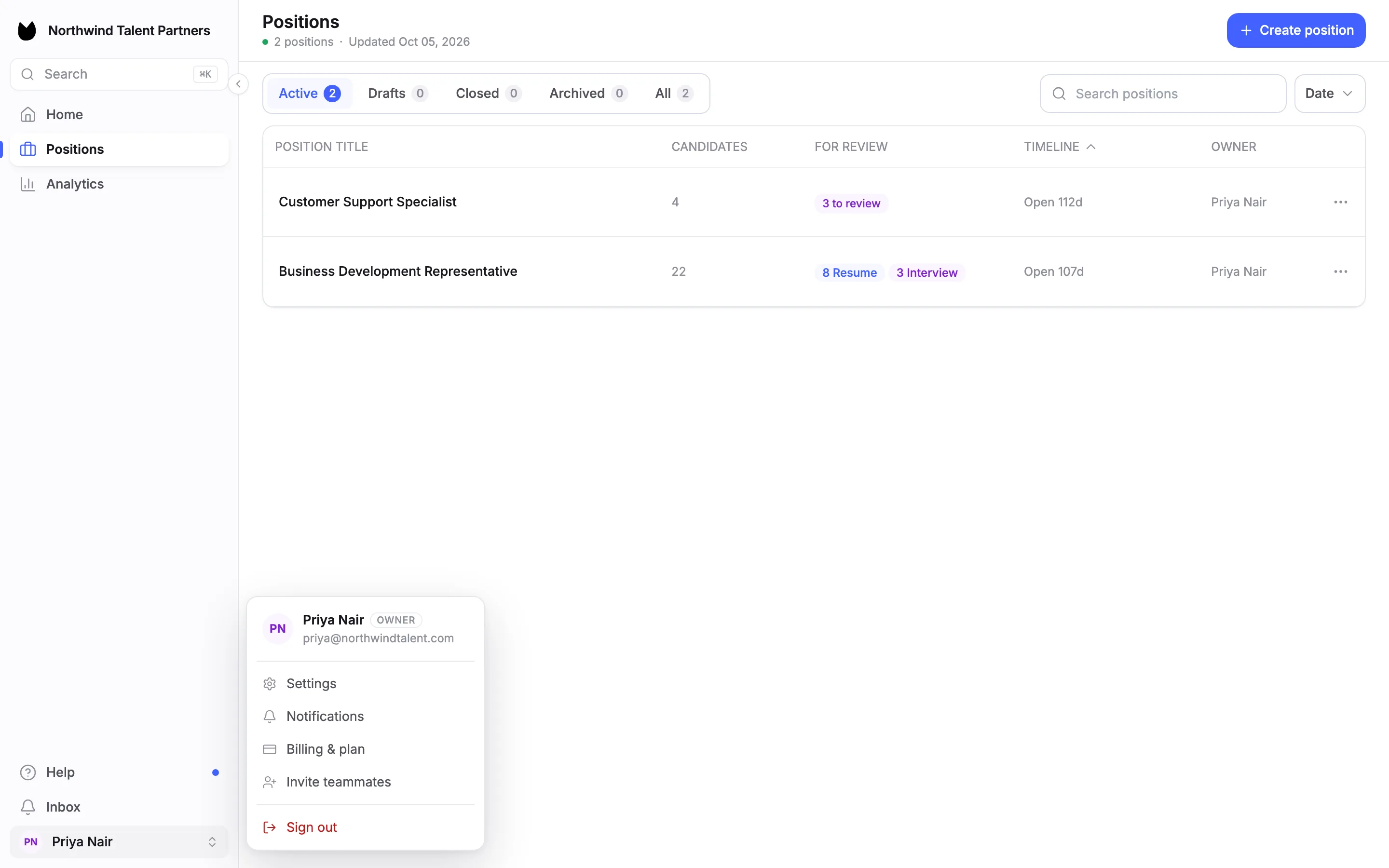
Choose your name at the bottom of the sidebar, then Billing & plan. The page reads Your subscription, credits, and invoices. You can also reach it from Settings, under Workspace.
2Read your plan card
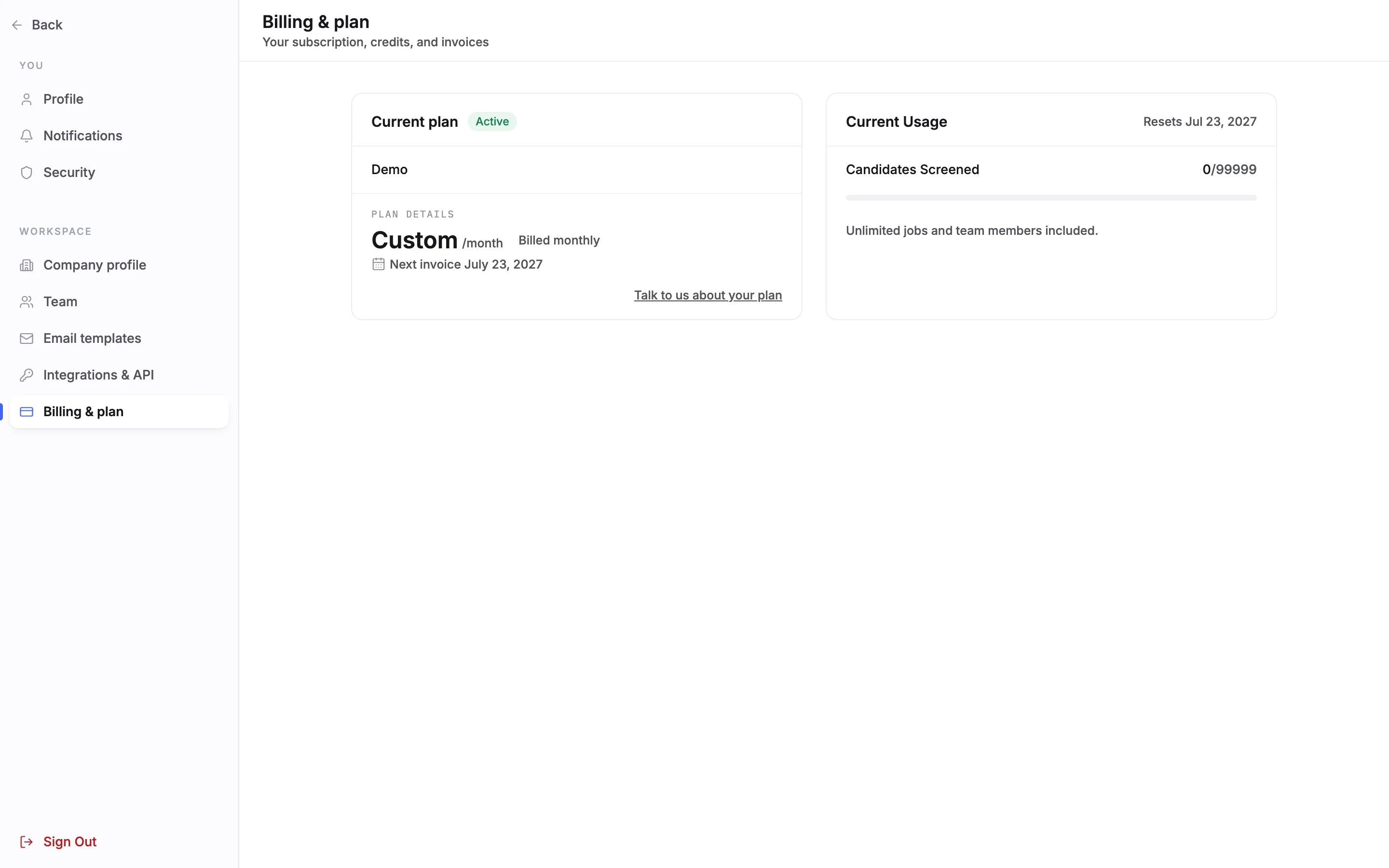
Current plan shows your plan, its status, such as Active, and under PLAN DETAILS the price and how it is billed. On a plan billed by card it also shows the next payment date and amount and the card on file. Its Update link opens the payment-method step of the billing portal, and a warning appears when the card expires before the next payment.
Note. The account in these pictures is on a Custom plan that is invoiced outside Truffle. Its card shows Next invoice with no amount or card, and no credits. A Starter, Core, Team or Scale plan shows the details described here.
3Check this period's credits
On a credit plan, Current Usage names the dates of the current billing period and splits the credits used into resume screens, assessments and one-way interviews. A resume screened costs 1 credit, an assessed candidate 2 and a completed one-way interview 5, all from one pool. If you go over the pool, the card offers the next plan up when its pool would cover your usage, with a conversation about a bigger plan as the other option.
Note. On Core, Team and Scale, screening past your pool keeps running and each extra credit is billed at $0.25. Starter is a hard cap with no overage. The Custom plan in the picture counts candidates instead of credits, so it shows neither the split nor the over-pool offer.
4Find an invoice
Billing history lists one row per billing period, newest first, with the current one tagged Current. Each row shows the plan, the credits used against the pool, and that period's invoice: its amount, a Paid, Open or Past due status, View and Download PDF links, and Pay now on an unpaid one. The three latest periods show first. Choose Show earlier periods for the rest.
Note. Billing history appears for plans billed by card, so it is not in the pictures above. Legacy and Custom plans billed by card see their invoices without the credits column.
5Move to a bigger or smaller plan
With an active subscription, you change plans on this page under the available plans, without contacting support. An upgrade applies right away. A move down is scheduled as a plan change. Every plan has every feature. Plans differ by the size of the monthly credit pool: Starter 200, Core 600, Team 1,500 and Scale 4,000.
Note. Credits you rolled over on Core, Team or Scale are forfeited when you downgrade. Starter does not roll credits over and has no annual billing. A Custom plan changes by talking to Truffle.
6Start a cancellation
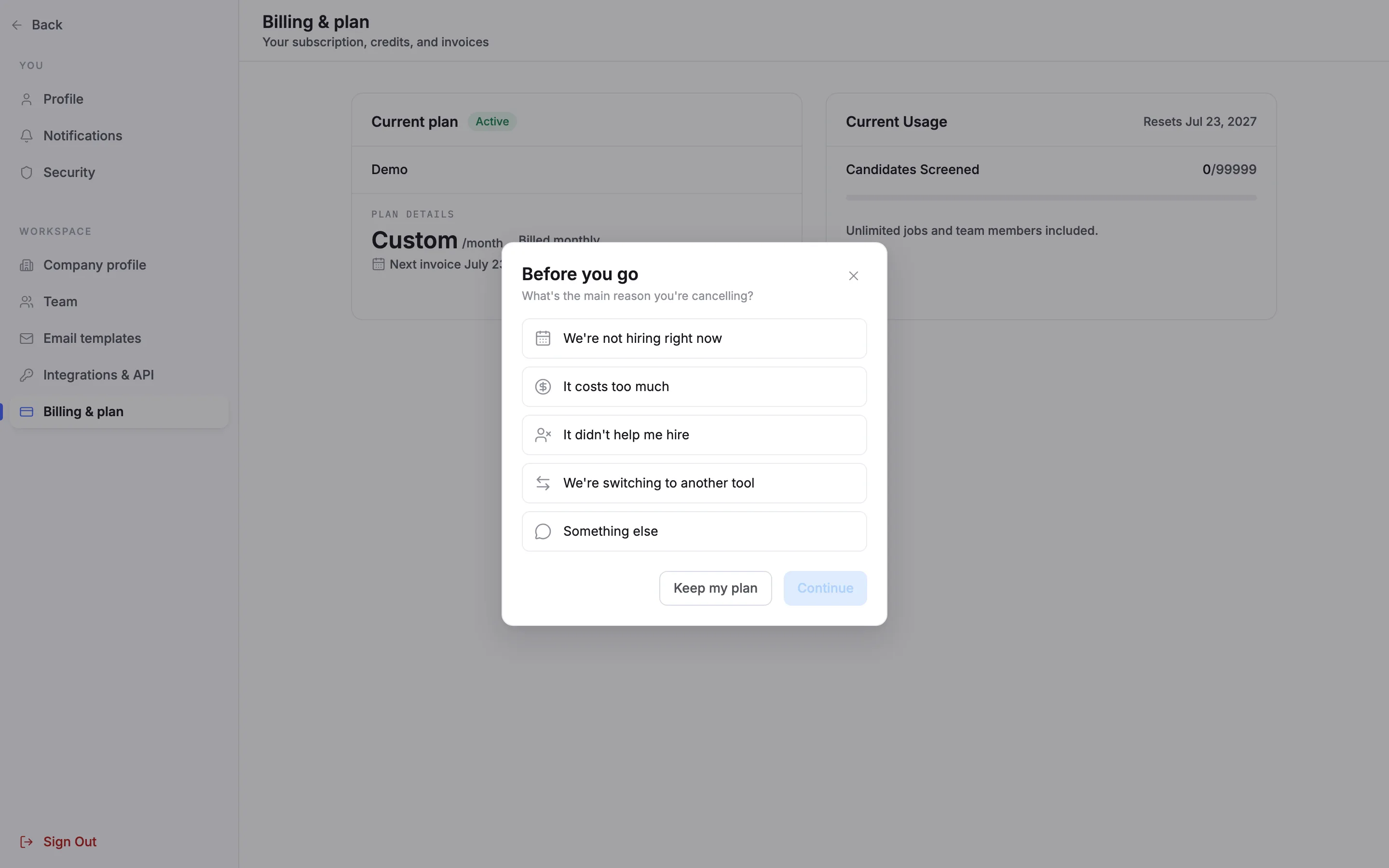
Choose Cancel subscription under the plan card. On a Custom plan the link reads Talk to us about your plan. A window opens: Before you go, What's the main reason you're cancelling?
7Pick your main reason
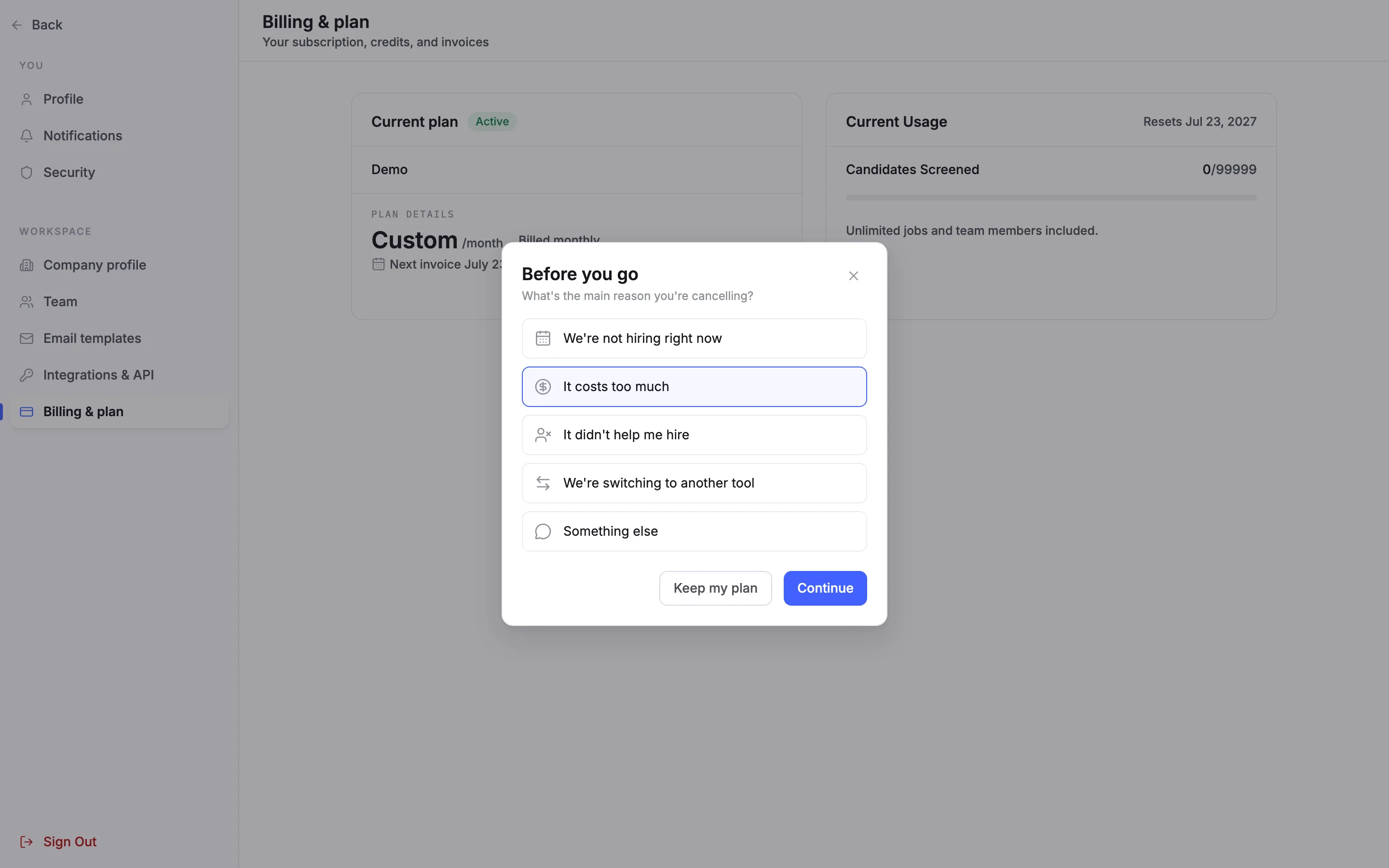
Choose one: We're not hiring right now, It costs too much, It didn't help me hire, We're switching to another tool or Something else. Continue becomes available once you pick. Keep my plan closes the window and changes nothing.
8Take or skip the offer
Depending on your reason, the next step may make one offer. It costs too much offers the next plan down, shown next to your current plan. It didn't help me hire and We're switching to another tool offer a 15-minute call with a founder, or a message instead. An account gets at most one offer every 30 days. Skip the offer to go on to the confirm step.
Note. On a Custom plan, the flow ends with a talk-to-us step instead of a self-serve cancel.
9Confirm, and what happens after
The confirm step says what happens. You keep full access until the end date of your billing period. After that, you need to reactivate to see your positions and candidates. Candidates can still apply and finish interviews for 14 days after that, then open positions close. Cancelling also drops any plan change you had scheduled. Once you confirm, the billing page shows the end date and an Undo cancellation button that reverses it in one click, any time before that date.
Note. You and the account owner get an email when the cancellation is scheduled, with an undo link, the day before access ends, and when the subscription has ended. Rolled-over credits are forfeited on cancel.
Questions
Do I lose access as soon as I cancel?
No. Cancelling stops auto-renewal, and you keep full access until the end of the current billing period. After that you need to reactivate to see your positions and candidates.
What happens to my open positions after I cancel?
Candidates can still apply and finish interviews for 14 days after your access ends. Then open positions close.
Can I change my mind after cancelling?
Yes. Until the end date, the billing page shows Undo cancellation, which reverses it in one click. The cancellation email has an undo link too.
What happens to my rolled-over credits if I downgrade or cancel?
They are forfeited. Roll-over applies on Core, Team and Scale only while you stay subscribed, for up to 12 months and up to 3 times the monthly pool.
What happens if I use more credits than my plan includes?
On Core, Team and Scale, screening keeps running and each extra credit is billed at $0.25. Starter is a hard cap with no overage, so a busy month never becomes a surprise bill. To screen more on Starter, move to a bigger plan.
Who can see invoices?
Billing history is visible to owners and admins only.
How do I change a Custom plan?
Custom plans are set up on a call. The plan card shows Talk to us about your plan in place of Cancel subscription.
Related
See something here that doesn't match what you see in Truffle? Tell us and we'll fix the page.