What are Workable video interviews and how do they work?
Workable's built-in video interviews cover the basics. Truffle goes further with resume screening, one-way video interviews, and talent assessments in one platform. AI surfaces match scores, summaries, and Candidate Shorts so you can identify who to talk to next.

AI summary
- Workable's one-way video interviews cover the basics (send questions, candidates record async, you review in the ATS), but your team rates every answer by hand, with no AI scoring of responses. Resume scoring (Workable Agent, on paid AI credits) and assessments are separate pieces, and video and assessments are paid add-ons on Standard. Teams hiring across time zones or at scale hit the limits fast.
- Truffle is an AI screening platform that combines resume screening, one-way video interviews, and talent assessments. Use any on its own or combine all three. AI transcribes responses, surfaces match scores and summaries, and generates 30-second Candidate Shorts so you can review a candidate in minutes instead of scheduling a call.
- Truffle integrates directly with Workable. Keep your ATS, add structured screening. Distributed teams get match scores, assessment results, and Candidate Shorts in one candidate view instead of scattered videos and notes.
Workable video interviews are built for one specific part of hiring: helping teams screen candidates before they spend time on live calls. If you already use Workable as your applicant tracking system, the feature sits inside the platform rather than forcing you to bolt on a separate tool. Workable describes it as a premium, built-in one-way video interview feature that lets teams create interview questions, send links to candidates, and review responses inside the ATS.
That makes Workable video interviews useful for early-stage filtering, especially when recruiters want more signal than a resume but do not want to schedule dozens of first-round phone screens. Below, I’ll break down what the feature is, how it works for employers and candidates, where it fits in the hiring process, and when a team might outgrow the built-in version and want a more specialized video interview platform.
What are Workable video interviews
Workable video interviews are Workable’s built-in one-way asynchronous video interview feature. Employers add a video interview to a pipeline stage, send candidates a link, and ask them to record answers to preset questions on their own time. Hiring teams then review those recordings, rate answers, and leave notes inside Workable.
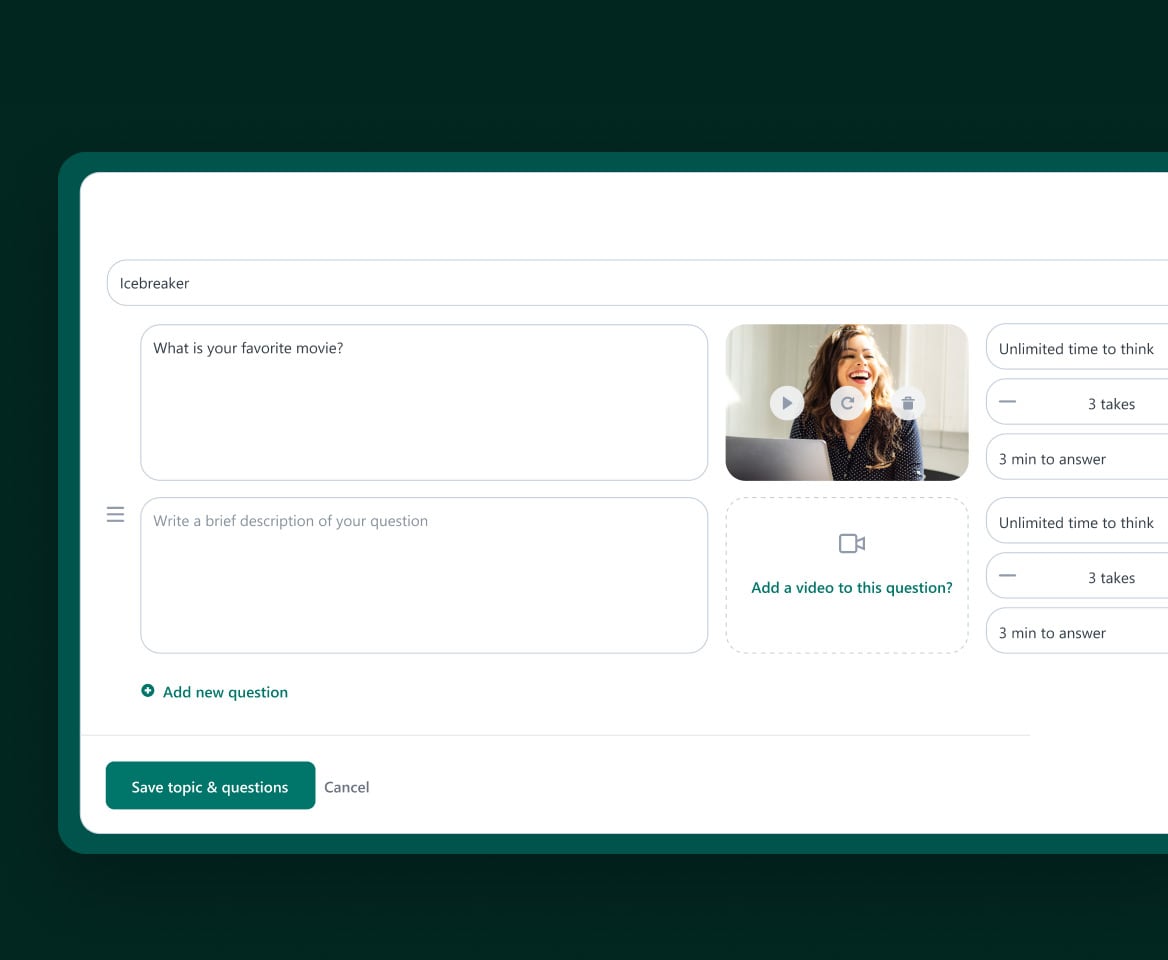
Because the feature is embedded in Workable, the main advantage is convenience. Teams already using Workable do not need a separate login or a separate review workflow just to collect async video responses. The feature is designed specifically for remote, early-stage screening and includes settings like deadlines, think time, time-to-answer limits, and allowed takes.
One-way vs two-way video interviews in Workable
Workable supports both asynchronous and live remote interviews, but they solve different problems. One is for efficient early screening. The other is for actual conversation.
One-way asynchronous video interviews
An asynchronous interview is the format Workable’s built-in video interview feature is designed for. Candidates receive a link, record answers to preset questions, and submit those recordings for later review. There is no live interviewer present, and candidates can complete the interview on a computer, tablet, or phone without downloading an app.
This format is best when you want flexibility and consistency. Every candidate answers the same questions, and hiring teams can review responses whenever it suits them instead of trying to coordinate calendars.
Two-way live video interviews
Two-way video interviews are live conversations between the candidate and interviewer. Workable’s help center describes these as scheduled video calls and notes that the platform integrates with Google, Microsoft, and Zoom to make scheduling easier. With Google calendar integration, Workable can generate a Google Meet link automatically; with Zoom, it can include a Zoom link in the calendar invite.
This format is better for later-stage interviews, when follow-up questions, back-and-forth discussion, and relationship building matter more than screening efficiency. That is why many teams use one-way interviews first, then move stronger candidates into live rounds.
Workable’s own docs make this distinction pretty clear: one-way interviews are submitted for evaluation later, while two-way interviews are scheduled live using calendar and meeting integrations.
How Workable video interviews work
Workable video interviews are simple on paper: build interview, send link, review answers. In practice, there are a few settings that shape the experience quite a bit for both employers and candidates.
How employers set up a video interview
Inside the job editor, employers go to the Workflow tab, choose a pipeline stage of type Phone Screen or Interview, and click Add video interview. From there, they can create a new interview, import one from another stage, or start with an AI-generated interview template based on the role.
Workable lets employers set a welcome title and note, choose a due date, and optionally add a welcome video. They can then create topics and questions, add written or recorded video questions, and configure settings such as think time, time to answer, number of takes, and what candidates are allowed to see before starting. There is also a Save & Preview step so the team can test the candidate experience before sending the interview.
How candidates record and submit responses
Candidates receive an email with a link to a landing page for the interview. That page can include company branding, job information, a welcome message, estimated interview duration, and the submission deadline. Workable says candidates can complete the interview on a computer, tablet, or mobile phone, with no software or app download required.
Candidates can start and pause the interview as needed, even across different days, as long as they submit before the deadline. Before recording, Workable runs a quick network, camera, and microphone test, and candidates can practice before beginning. If multiple takes are enabled, they can review their takes and choose the best one to submit. Once finished, they submit the interview and see a confirmation message.
How hiring teams review and evaluate candidates
Once a candidate submits, the interview appears on the candidate’s timeline and under the Review > Video Interviews tab in Workable. Reviewers can watch each answer, move through question-by-question recordings, see captions in supported languages, rate each answer using the company’s rating scale, and add notes. After the final question, they can add an overall evaluation for the candidate.
Those evaluations are saved to the candidate’s timeline, and reviewers can compare their feedback with coworkers in the Review > Evaluations tab. In other words, Workable treats video interviews as one more evaluative step inside the broader ATS workflow rather than as a separate screening product.
Why companies use video interviews for candidate screening
Video interviews solve some very practical early-stage screening problems. The main appeal is not that they are flashy. It is that they remove calendar friction from the top of the funnel.
- Reduce time to hire: Teams can screen multiple candidates without scheduling one phone call after another. Workable positions one-way interviews as a way to identify dealbreakers earlier in the process.
- Lower screening costs: Async interviews reduce the recruiter time spent on first-round scheduling and repetitive intro calls.
- Standardize the evaluation process: Every candidate answers the same questions, which makes side-by-side comparison easier and usually fairer than ad hoc screens. Workable’s per-question rating flow reinforces that consistency.
- Enable team collaboration: Multiple reviewers can watch and evaluate responses inside the platform instead of trying to attend the same live screening call.
- Reach remote and global candidates: Candidates can complete interviews from any device, on their own time, without app downloads.
- Improve candidate experience: Flexible completion, practice mode, pause-and-return functionality, and no scheduling back-and-forth all reduce friction for candidates.
What questions to ask in a one-way video interview
The best Workable video interview questions are open-ended, job-relevant, and short enough for candidates to answer well within a timed format. Workable lets employers group questions into topics and control think time, answer length, and retakes, so it makes sense to use prompts that are easy to understand on first read and do not require a long explanation.
Good question types include:
- Behavioral questions: “Tell me about a time when…”
- Situational questions: “How would you handle…”
- Role-specific questions: prompts tied to the actual job, tools, or domain
- Culture-fit questions: values, work style, and motivation questions
The practical rule here is simple: keep questions concise. In a one-way format, long or overcomplicated prompts usually make candidate answers worse, not better.
What are the disadvantages of video interviews
Recruitment video interview software can save time, but they also create tradeoffs. Some are technical. Some are human.
Technical difficulties
Candidates can run into camera, microphone, browser, or connectivity issues. Workable’s own troubleshooting guide calls out browser cache, browser version, network quality, device issues, camera issues, and microphone issues as common problems, and recommends extending deadlines when needed.
Personality and appearance bias
Video gives more signal than a resume, but it can also introduce bias if reviewers are not using structured criteria. Workable supports rating scales and question-by-question evaluations, which helps, but teams still need clear rubrics so they are judging answers and job relevance rather than confidence, appearance, or camera polish. Dedicated video interview tools that layer transparent scoring logic on top of structured rubrics can reduce this problem further.
Limited human interaction
The one-way format is efficient, but it is not warm. Candidates do not get follow-up questions, live rapport, or reassurance in the moment. That can make the experience feel more transactional than a live first-round call, especially if the employer does not provide a clear introduction or welcome context. Workable partly addresses this with branding, welcome notes, welcome videos, and practice mode, but the tradeoff is still real.
Workable video interviews vs dedicated video interview platforms
Workable’s video interviews are an embedded ATS feature. That is convenient if you want basic async collection and evaluation inside one system. Dedicated video interview platforms go further: they are built specifically for screening depth, AI-assisted analysis, and faster prioritization once dozens or hundreds of candidates have completed interviews.
Workable’s docs emphasize interview creation, deadlines, settings, notes, and manual rating scales. By contrast, dedicated platforms like Truffle emphasize AI-generated summaries, match percentages, explainable scoring, and short highlight reels that help recruiters review candidates faster. That is the key difference: Workable gives you video collection inside your ATS, while specialized platforms are designed to help you analyze and prioritize candidate responses more aggressively.
| Capability | Workable built-in | Dedicated platforms |
|---|---|---|
| Basic async recording | Yes | Yes |
| AI-powered scoring | Manual ratings and notes are native | Yes, on some tools such as Truffle |
| Transparent rubrics | Native ratings, but no built-in match-percentage explanation layer highlighted in docs | Yes, on tools that show scoring rationale |
| Match percentage ranking | Not highlighted in native Workable video interview docs | Yes, e.g. Truffle |
| Candidate highlight reels | Not highlighted in native Workable video interview docs | Yes, e.g. Truffle Candidate Shorts |
| Works with any ATS | Native to Workable | Many dedicated tools are designed to layer onto an ATS stack |
That is why some teams use Workable’s built-in feature for lightweight screening, while others pair Workable with a dedicated video interview platform when they want more advanced AI analysis and prioritization.
How to choose the right video interview tool
If you are evaluating Workable video interviews against dedicated options, these are the criteria that matter most:
- Setup speed: can you launch interviews quickly without a heavy implementation burden? Workable’s built-in option is convenient if you are already inside the ATS.
- AI evaluation features: does the tool only collect responses, or does it also summarize, score, and rank candidates against job requirements? Truffle, for example, highlights AI summaries, match scores, and reasoning.
- Integration options: does it fit your ATS stack? Workable’s built-in tool is obviously native; separate platforms matter more when you need them to work alongside your ATS.
- Team collaboration: can multiple reviewers score independently and compare feedback without meeting live? Workable supports shared evaluation and comparison; specialized platforms may add faster shortlist views.
- Candidate experience: is it mobile-friendly, easy to access, and free of app downloads? Workable is, and that should be table stakes.
- Bias reduction: does the tool help keep evaluation focused on structured job-relevant criteria rather than vibes? That depends on both your process and the platform’s scoring design.
Screen candidates faster with one-way video interviews
If you just need a basic one-way interview tool inside your ATS, Workable’s built-in option covers that. But collecting videos isn’t usually the bottleneck. Getting from completed interviews to a shortlist is.
Truffle is an AI screening platform that combines one-way video interviews with resume screening and talent assessments. Candidates record responses on their own time. AI transcribes, summarizes, and scores each answer against your criteria, then surfaces Candidate Shorts (30-second highlight reels of the most relevant moments) so you can review a candidate in seconds instead of scheduling a call.
You can use Truffle for video interviews alone. But if you want more signal, layer in resume screening and assessments so interview responses sit next to qualification data and assessment results in one candidate view.
If video collection isn’t your bottleneck but making faster, more confident decisions is, try Truffle for free to see how it fits alongside your ATS.
FAQs about Workable video interviews
How do you spot fake candidates in video interviews?
Look for mismatched audio and mouth movement, suspiciously unnatural delivery, answers that sound heavily pre-written, or eye movement that suggests script-reading. AI-detection and structured review tools can help flag responses that appear likely to have been heavily AI-assisted, but human review still matters.
How do candidates pass a video screening interview?
Candidates give themselves the best chance by testing their camera and microphone beforehand, using a quiet and well-lit space, and practicing concise answers that fit the platform’s time limits. Workable’s own candidate flow includes equipment tests, practice mode, and visible interview deadlines.
Can you use a third-party video interview tool with Workable?
Yes. Workable itself distinguishes between native one-way video interviews and external video interview integrations, and it also supports scheduling for external meeting tools. Teams that want more advanced functionality often layer a dedicated video interview product onto their ATS stack rather than relying only on the built-in feature.
How much do Workable video interviews cost?
As of October 2026, Workable lists video interviews as a $109/month add-on on Standard with annual billing ($130 billed monthly) for companies with 1-20 employees, while Premier and Enterprise include video interviews. The add-on price rises with company headcount, so the best source for the latest numbers is Workable’s pricing page.
What happens if a candidate has technical issues during a Workable video interview?
Workable recommends standard troubleshooting first: clear browser cache, update or switch browsers, try a stronger network, or use a different device. If the problem continues, the employer can extend the deadline and Workable support may ask for more details such as the exact error and troubleshooting already attempted.