IT help desk technician: job description, interview questions, and screening workflow
The generic advice for this role is "require CompTIA A+ and ask about their experience." At a small company, that advice is close to backwards. You're not hiring a specialist to slot into a team of specialists. You're hiring the only person the whole company will call when something breaks, with no one behind them. The thing that sinks a help desk hire is almost never a missing certification. It's the two things a resume can't show: whether they stay calm and clear with a frustrated, non-technical coworker, and whether they have the judgment to know what to fix themselves versus what to escalate when there's no senior tech to ask. This guide is built to screen for those two things, because they're what actually decide whether this hire works out, and they're exactly what a stack of resumes hides.
What an IT help desk technician actually does at a small company
This role is front-line user support, not backend infrastructure ownership; if the opening you're actually filling is servers, network, backups, and cloud accounts rather than the person coworkers call when something's broken, see our system administrator hiring guide instead, since some tiny companies need both jobs done by one person and some split them into two hires as they grow. At a large company, IT is a department. Someone owns ticket routing, someone owns hardware procurement, someone owns security, and a help desk technician handles a narrow slice of it. At a small IT-services shop or a 20-80 person software company, there's usually one person, or one and a half, doing all of it. They're the first line of defense before something gets escalated to an outside MSP, a vendor, or the founder's own inbox.
That compresses a whole department into one person's day. The core responsibilities, in practice:
- Triaging incoming tickets and deciding what's urgent versus what can wait
- Resetting passwords and managing account access requests
- Troubleshooting hardware and software issues over chat, phone, or in person
- Setting up and provisioning laptops for new hires, and wiping and reclaiming them when someone leaves
- Keeping basic security hygiene in place: patching, backups, phishing awareness
- Knowing when a problem is beyond them and needs to go to an outside MSP or a vendor
- Documenting fixes so recurring issues don't get solved from scratch every time
The technical bar for this role isn't usually the hard part. Most day-to-day tickets are routine: a password reset, a printer that won't connect, a laptop that needs setting up. The hard part is judgment and communication: knowing what to fix yourself, what to escalate, and how to explain a fix to someone who doesn't know what a router is without making them feel stupid. At a small company, that person is often the only IT anyone sees, so how they communicate matters as much as what they know.
Job description you can post today
Copy this, then adjust the specifics (your hours, your ticketing system, your tools) to match your company.
IT help desk technician
[Company name] is looking for an IT help desk technician to be the first point of contact for our team's technology issues. You'll troubleshoot hardware and software problems, manage onboarding and offboarding for laptops and accounts, and keep our small team running without interruption.What you'll do
Triage and resolve incoming IT tickets. Reset passwords and manage account access. Troubleshoot hardware, software, and connectivity issues for employees in person, by chat, or by phone. Set up new hire laptops and accounts, and reclaim equipment when someone leaves. Escalate issues that are beyond your scope to our outside IT vendor or MSP. Keep basic documentation so recurring problems don't get solved from scratch every time.What we're looking for
Hands-on troubleshooting experience with common hardware, software, and networking issues. Comfort explaining a technical problem to a non-technical person in plain language, without jargon. Good judgment about what to fix yourself and what to escalate, since you'll often be the only IT person in the building. Certifications like CompTIA A+ are a plus but not required if you can demonstrate the skill.Schedule
[Insert hours, e.g. Monday-Friday, 9am-5pm, with occasional after-hours availability for urgent issues][Insert pay range, per your company's policy and any applicable state salary transparency requirements]
10 interview questions, and what a good answer sounds like
1. Walk me through diagnosing a laptop that won't connect to wifi for a non-technical employee.
You're checking for an actual diagnostic process, not a guess. A strong answer moves in order: confirm the problem (is it just this device, is wifi down for everyone), check the obvious things first (airplane mode, the right network selected, a restart), then work through drivers, saved network settings, and router-side issues if the basics don't fix it. A weak answer jumps straight to "I'd restart the router" without first isolating whether the problem is on the laptop or the network.
2. Explain how you'd walk a confused employee through restarting their computer, over the phone, without being able to see their screen.
This tests plain language under a real constraint. Listen for short, specific instructions, one step at a time, with checkpoints ("tell me what you see now") instead of a long string of steps delivered all at once. A candidate who uses jargon like "power cycle" or "boot into safe mode" without translating it, or who gets visibly impatient describing the scenario, is telling you something about how they'll actually handle this call.
3. Tell me about a time you were the only person who could fix something, and there was no one to escalate to.
At a small company, this happens constantly. You want a real story, not a hypothetical: what the problem was, how they worked through it without backup, and what they did when they genuinely got stuck (research, vendor documentation, a support forum, calling a vendor's line). A candidate who can't produce a real example, or who describes waiting around for someone else to handle it, may struggle in a role where they're often the only line of defense.
4. You've got five tickets open and three people think theirs is the emergency. How do you decide what to work on first?
Good answers describe a real triage logic: what's actually broken versus what's inconvenient, how many people are affected, whether there's a workaround in the meantime. Watch for candidates who just say "I'd do them in order" or "whoever asks first," which suggests they haven't had to actually manage competing priorities under pressure.
5. Walk me through setting up a new hire's laptop, from unboxing to their first login.
This should come out as an ordered checklist, because it's something they've likely done many times: imaging or setup, installing required software, creating accounts and setting permissions, connecting to email and any shared drives, and a basic security pass (updates, antivirus, password policy). A candidate who's vague on this, or forgets account and access setup entirely, may not have owned onboarding independently before.
6. What's your process for a password reset request? What do you check before you actually reset it?
This is a security question disguised as a routine-task question. A strong answer includes some form of identity verification before resetting anything, even if it's informal at a small company (a known employee, a callback to a known number or manager). A candidate who says they'd just reset it on request, with no verification step at all, is a real flag, since password resets are one of the most common social engineering targets.
7. An employee says "the internet is down," but it turns out only their computer is affected. What do you check first?
You're looking for the instinct to isolate the problem before assuming the worst. A strong answer starts narrow: is it just this device, does another device on the same network work fine, then works outward to cables, wifi adapters, and DNS or browser-specific issues. A weak answer treats every report of "the internet is down" as an actual outage and starts troubleshooting the router first.
8. Tell me about a time you had to escalate a problem to an outside vendor or MSP. How did you decide it was time to hand it off?
This tests the judgment that matters most in a role with no internal backup. Listen for a clear line: they tried a defined set of steps, hit a limit (needed vendor-level access, a hardware replacement, specialized expertise), and escalated with a clear summary of what they'd already tried. A candidate who either never escalates (a risk, since some problems need a specialist) or escalates too fast (a cost, since you're likely paying an outside MSP by the hour) is worth probing further.
9. How do you keep track of recurring issues so you're not solving the same problem from scratch every time?
Good answers mention some form of documentation, even an informal one: a running notes doc, a ticketing system's knowledge base, or a personal habit of writing down fixes. This matters more at a small company than it sounds, because there's no team to absorb tribal knowledge if this person leaves. A candidate who says they just remember things, with no system at all, is a risk for continuity.
10. Why are you interested in a help desk role at a small company, where you'll be the only IT person, rather than joining a bigger IT team?
This surfaces whether they understand what they're signing up for. A strong answer names something real: more ownership, more variety, direct visibility into the whole business instead of one narrow slice of a ticket queue. A candidate who can't articulate a reason beyond "it was the job that was open" may be less prepared for the isolation and range this role actually requires.
A scorecard you can score candidates against
Ten questions are only useful if everyone on your side is listening for the same thing. Score every candidate on the same six signals, so you're comparing evidence instead of comparing gut feelings from six different conversations. Copy this into a doc and fill in a row per candidate.
| What you're scoring | Strong signal | Weak signal |
|---|---|---|
| Diagnostic process | Isolates the problem before guessing: is it one device or the network, what changed, what to check first, second, third | Jumps straight to a fix ("restart the router") without narrowing down where the problem actually is |
| Plain-language communication | Explains a fix to a confused coworker in short steps, with checkpoints, no untranslated jargon | Uses terms like "power cycle" without translating, or gets visibly impatient describing the scenario |
| Escalation judgment | Has a clear line for handing off to an MSP or vendor: tried a defined set of steps, hit a real limit, escalated with a summary | Never escalates (a risk) or escalates immediately (a cost you pay by the hour) |
| Working solo | Real story of fixing something with no backup: research, vendor docs, a support line, figuring it out | Waited for someone else to handle it, or can't produce a real example |
| Security instinct | Verifies identity before a password reset, even informally, without being prompted to | Would just reset on request, no verification step at all |
| Continuity | Documents recurring fixes somehow: a notes doc, a ticket knowledge base, a personal habit | "I just remember things." No system, so the knowledge leaves when they do |
How to screen IT help desk technician candidates without losing a week to it
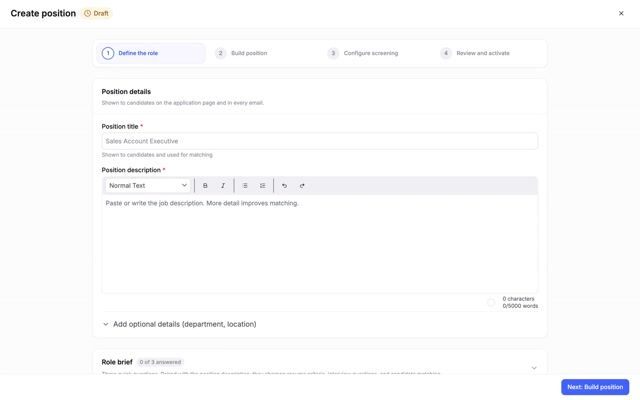
Truffle is an AI screening platform that combines one-way video interviews, talent assessments, and resume screening, so you can build a screening workflow around what actually matters for a role that gets flooded with candidates and has almost no in-house technical backup to lean on.
The market downturn has pushed applicant volume for tech and support roles way up, even at small companies with nobody to sort through it. On top of the volume, there's a growing problem of candidates who aren't who they say they are: proxy interviewees, or someone running an AI overlay during a live video call and feeding them answers in real time. A live panel interview is the easiest format to game this way, since there's a screen and a moment-to-moment feed for an overlay to work against. A one-way interview, where a candidate responds to your specific prompts on their own time and you review the recording afterward, is a harder setup to run that kind of live coaching against, though it's worth being honest that no single step makes a process impossible to game. The point isn't a single unbeatable filter. It's stacking a few signals that are each harder to fake than the last.
A workflow that fits a small IT-services shop or a small software company:
- Resume screening first. Cut the obvious mismatches on tools, ticketing systems, and hands-on troubleshooting experience before you spend time on anyone. This is also where you deal with volume: a flood of applicants for one opening is manageable once you're not reading every resume yourself.
- A short one-way video interview, not a live panel round, for your first real look. Ask 2-3 of the scenario questions above, like the wifi troubleshooting question or the plain-language explanation question, so you can hear how someone actually reasons through a problem and talks to a non-technical person, before you commit any live interview time.
- A short, practical skills check instead of a long take-home. Candidates increasingly resist multi-hour take-home projects, and a lengthy assessment can cost you good candidates who simply won't do it. Our free computer literacy examination is built to be short and job-relevant: file management, troubleshooting judgment, security basics, the kind of baseline skill a help desk technician needs on day one, without asking someone to burn an evening on a project.
- A real, live conversation only for the candidates who clear the first three steps. By the time you're on a call, you already know they can troubleshoot, communicate in plain language, and clear a basic skills bar. The live conversation is for fit and judgment, not for finding out for the first time whether they can do the job.
Our resume screening and one-way video interview tools handle the first two steps in one place, with AI that surfaces your strongest matches against the criteria you set. You review the evidence and decide. It doesn't pick for you.
3 sample questions to try for this role
A skills check only helps if it tests the judgment the job needs, not trivia. These three come from our free computer literacy examination question bank. They're the kind of question that separates someone who can talk about IT from someone who can do it. Try them yourself before you decide what "job-ready" means for your opening.
1. A website works for a coworker but not on this employee's computer. The page won't load right and buttons are unresponsive. Sensible first step? Reveal answer
Best answer: clear the browser cache for that site, or try an incognito/private window. A private window isolates cache, cookies, and extensions, so it's a fast, low-risk way to tell whether the problem is the site or the setup, before touching anything drastic. Answers like "factory reset the computer" or "uninstall OS updates" are the tell: they skip diagnosis and reach for the nuclear option.
2. An email "from IT" says the password expires today. The sender is it-support@companny-security.com and the "Company SSO" link points somewhere unfamiliar on hover. What do you do? Reveal answer
Best answer: report it as phishing and verify through an official channel. The misspelled domain and the mismatched link are classic phishing signals. For a help desk hire this is non-negotiable: they're the person other employees will forward suspicious emails to, so they can't be the one who clicks. "Click quickly to avoid being locked out" is exactly the instinct you're screening out.
3. An application is frozen and won't close. Best next step? Reveal answer
Best answer: use the OS force-quit / task manager to close it, then reopen and recover work if possible. Force quit is a standard recovery step that minimizes downtime. Someone who says "wait indefinitely, forcing it is never safe" or "delete system files" is either overcautious or reckless, and both create more tickets than they close.
The point isn't these three questions. It's that a short, job-relevant skills check like this tells you in twenty minutes what a resume and a friendly interview can hide: whether someone actually reaches for the right move under a little pressure. Use them in your own interview or as a short take-home. Truffle's built-in assessments cover judgment, personality and work style, not right-answer skills tests, so keep a check like this as your own step. You still make the call on who clears it.
Common hiring mistakes for this role
Over-indexing on certifications instead of testing actual troubleshooting ability. A certification tells you someone studied for a test. It doesn't tell you whether they can stay calm and methodical when a laptop won't connect to wifi and an employee is getting frustrated. Weight real troubleshooting scenarios in the interview above a line item on a resume.
Not testing plain-language communication skill. This is often the real differentiator at a small company, where the help desk technician talks directly to confused coworkers instead of routing everything to a specialist team. A technically strong candidate who can't explain a fix without jargon will generate as much frustration as they resolve.
Letting applicant volume overwhelm you without a real filter. The hiring market has pushed volume way up even for small-company openings, and reading every resume yourself at night isn't a plan, it's a bottleneck. Build a layered screen (resume, then a short one-way interview, then a skills check) so the applicant list gets shorter before it reaches your calendar.
Hiring someone who needs an IT department they don't have. A candidate who's only ever worked on a larger IT team, with specialists to lean on for anything hard, may struggle when they're the only line of defense and the next stop is an outside MSP. Probe directly for how someone handles being stuck with no one to ask.
Trusting a smooth interview without verifying it's the real candidate. Proxy interviewees and AI-assisted live answers are a growing problem in tech hiring, and a polished live call isn't proof of anything on its own. Combine a resume screen, a one-way interview where the candidate responds on their own time, and a short skills check, so you're triangulating more than one signal instead of betting the hire on a single conversation.
What should your screening process look like?
Answer six quick questions about how you hire. We'll point you to the screening steps that fit, so you spend your time on the candidates worth a conversation.
What each result looks like
Start with resume screening
You're working through real volume, and the resume still carries signal. Score every resume against your criteria first, so a shortlist surfaces before you spend time on anyone.
- Resume screeningScore every resume against your criteria and surface your strongest matches first.
- One-way interviewsHear how candidates think on a recorded prompt, on their schedule and yours.
7-day free trial. No credit card required.
Lead with one-way interviews
Resumes look interchangeable and phone screens are eating your week. Let candidates answer a recorded prompt on their own time. You watch the moments that matter and decide who's worth a live round.
- One-way interviewsHear how candidates think on a recorded prompt, on their schedule and yours.
- Resume screeningScore every resume against your criteria and surface your strongest matches first.
7-day free trial. No credit card required.
Anchor on talent assessments
For these roles the work matters more than the paper. Put a role-calibrated assessment up front, so you see real, comparable evidence before you book a calendar slot.
- Talent assessmentsSee role-calibrated work before you spend a calendar slot on a live round.
- One-way interviewsHear how candidates think on a recorded prompt, on their schedule and yours.
7-day free trial. No credit card required.
Layer all three signals
Your hiring spans high volume and high stakes, so no single step covers it. Layer all three: score resumes first, hear candidates on a one-way interview, then confirm with an assessment. Each step narrows the field, and you make the call at every stage.
- Resume screeningScore every resume against your criteria and surface your strongest matches first.
- One-way interviewsHear how candidates think on a recorded prompt, on their schedule and yours.
- Talent assessmentsSee role-calibrated work before you spend a calendar slot on a live round.
7-day free trial. No credit card required.