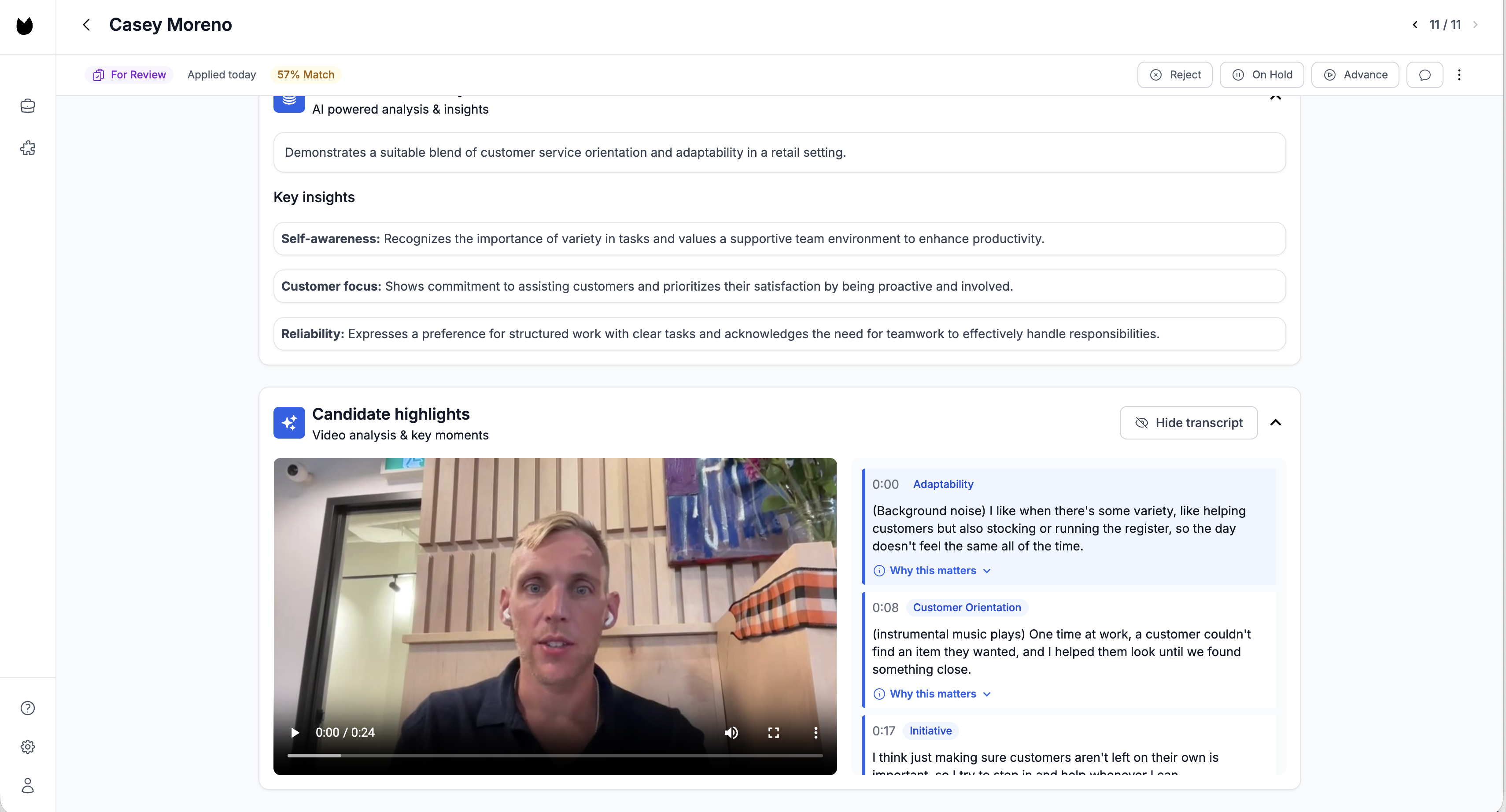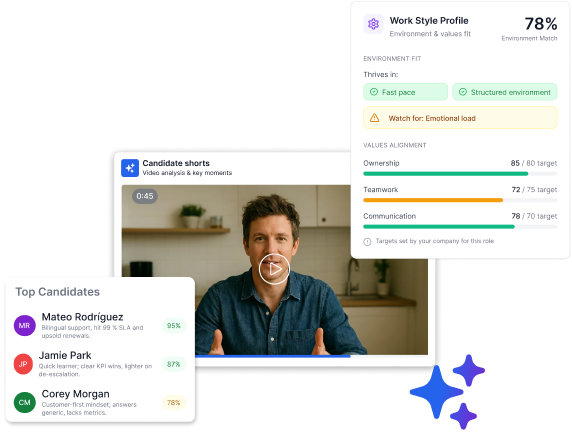
Candidate Shorts is a new feature in Truffle's AI-assisted screening platform that automatically creates a ~30-second highlight reel from each candidate’s async interview answers so you can review more candidates without watching full video interviews.
How Candidate Shorts works
Candidate Shorts uses Truffle's AI to pick out the most relevant clips from each candidate's answers based on the job the description, usually 10 seconds each, and stitches them together into a ~30-second video.
These shorts play directly on the candidate’s summary page in your Truffle dashboard. No need to click around or scrub through full recordings—Truffle surfaces the most relevant moments so you can decide who's worth a conversation.

How to use Candidate Shorts in Truffle
From any active job:
- Open the Candidates tab
- Click on a candidate card
- The Candidate Short is on the right-hand side
- Press "Screening" if you want to go deeper
Note: Candidate Shorts is available for all candidates who’ve completed a video interview in Truffle after September 23rd, 2025.
Once live, every reel is tied to that candidate’s submission so it’s always visible in the candidate profile.
Here’s how it works
1. Candidates record async video interview answers—on their time, not yours
2. Truffle picks out high-signal moments based on your job description and the intake and auto-generates a ~30-second reel
3. You press play and decide in under 2 minutes
That’s it. It’s like watching a trailer instead of the full movie.
Use cases of Candidate Shorts
Here’s what we learned from rolling out Candidate Shorts in beta.
1. Screening high-volume roles
If you're hiring for high-volume roles with 100+ applicants, Candidate Shorts helps you move fast:
- Review dozens of candidates in a fraction of the time
- Spot top picks quickly
- Send fewer rejection emails, faster
It’s especially helpful for customer-facing or retail roles where tone and communication matter more than resumes.
2. Moving fast between other priorities
Founders, general managers, and hiring managers can now make screening decisions in between other tasks with no need to schedule screening calls or watch every second of footage.
- Press play on a few shorts during lunch
- Decide who gets a call back
- Keep your hiring flow moving while running the business
3. Managing multiple roles at once
If you're managing hiring across multiple departments or roles, Candidate Shorts helps you stay efficient:
- Skip the first-round screen
- Use the reel as a warm intro before the final interview
- Get hours back every week
It’s like your own personal recruiting assistant and saves you a ton of scheduling hassle.
4. Aligning with hiring managers
Candidate Shorts are also helpful when you need to get quick feedback from a hiring manager:
- Send them a batch of 3–5 reels
- Ask: “Would you meet any of these?”
- Avoid long email threads or slowdowns
This helps cross-functional teams make faster, more collaborative hiring decisions.
Upcoming features
We’re working on a few additions to make Candidate Shorts even more powerful, namely the ability to share Candidate Shorts and candidate profiles externally so you can loop in collaborators.
If you have feedback or ideas, we’d love to hear from you. Drop suggestions through your dashboard or via the support chat.
Try it now
Candidate Shorts is available now for all Truffle users on any plan, no upgrade required.
The TL;DR
Candidate Shorts is a new feature in Truffle's AI-assisted screening platform that automatically creates a ~30-second highlight reel from each candidate’s async interview answers so you can review more candidates without watching full video interviews.
How Candidate Shorts works
Candidate Shorts uses Truffle's AI to pick out the most relevant clips from each candidate's answers based on the job the description, usually 10 seconds each, and stitches them together into a ~30-second video.
These shorts play directly on the candidate’s summary page in your Truffle dashboard. No need to click around or scrub through full recordings—Truffle surfaces the most relevant moments so you can decide who's worth a conversation.

How to use Candidate Shorts in Truffle
From any active job:
- Open the Candidates tab
- Click on a candidate card
- The Candidate Short is on the right-hand side
- Press "Screening" if you want to go deeper
Note: Candidate Shorts is available for all candidates who’ve completed a video interview in Truffle after September 23rd, 2025.
Once live, every reel is tied to that candidate’s submission so it’s always visible in the candidate profile.
Here’s how it works
1. Candidates record async video interview answers—on their time, not yours
2. Truffle picks out high-signal moments based on your job description and the intake and auto-generates a ~30-second reel
3. You press play and decide in under 2 minutes
That’s it. It’s like watching a trailer instead of the full movie.
Use cases of Candidate Shorts
Here’s what we learned from rolling out Candidate Shorts in beta.
1. Screening high-volume roles
If you're hiring for high-volume roles with 100+ applicants, Candidate Shorts helps you move fast:
- Review dozens of candidates in a fraction of the time
- Spot top picks quickly
- Send fewer rejection emails, faster
It’s especially helpful for customer-facing or retail roles where tone and communication matter more than resumes.
2. Moving fast between other priorities
Founders, general managers, and hiring managers can now make screening decisions in between other tasks with no need to schedule screening calls or watch every second of footage.
- Press play on a few shorts during lunch
- Decide who gets a call back
- Keep your hiring flow moving while running the business
3. Managing multiple roles at once
If you're managing hiring across multiple departments or roles, Candidate Shorts helps you stay efficient:
- Skip the first-round screen
- Use the reel as a warm intro before the final interview
- Get hours back every week
It’s like your own personal recruiting assistant and saves you a ton of scheduling hassle.
4. Aligning with hiring managers
Candidate Shorts are also helpful when you need to get quick feedback from a hiring manager:
- Send them a batch of 3–5 reels
- Ask: “Would you meet any of these?”
- Avoid long email threads or slowdowns
This helps cross-functional teams make faster, more collaborative hiring decisions.
Upcoming features
We’re working on a few additions to make Candidate Shorts even more powerful, namely the ability to share Candidate Shorts and candidate profiles externally so you can loop in collaborators.
If you have feedback or ideas, we’d love to hear from you. Drop suggestions through your dashboard or via the support chat.
Try it now
Candidate Shorts is available now for all Truffle users on any plan, no upgrade required.
Try Truffle instead.