A budget-friendly alternative to Indeed's one-way interview
You don't have time to phone-screen every candidate just to find the handful who meet your must-haves. That's why Indeed's one-way interview took off: candidates recorded short video answers on their schedule, and you reviewed on yours. Indeed retired that as a standalone interview step, and what's left in its place isn't a real substitute. Here's exactly what changed and how to rebuild the workflow on software you control.


AI summary
- Indeed replaced its dedicated one-way interview feature with Indeed Interview, a live, scheduled video tool. There's no structured, multi-question async interview in the replacement, so if you relied on the old feature for high-volume screening, that step is gone, not just hidden.
- Indeed still lets candidates record a voice or video answer to individual screener questions during the application. It's a lighter, single-question feature, not a structured interview with a question set, time limits, retakes, or scoring, so it doesn't close the gap on its own.
- You no longer have to redirect applicants off Indeed to screen them. Indeed can email each application to a screening tool that accepts them, so candidates apply on Indeed as normal and arrive on the other side with their resume attached and scored. In Truffle that's auto-import, and it's one address pasted into the Indeed job, set once.
- A strong replacement is a short, structured async screen (3-6 questions, 10-20 minutes, 1 retake) optimized for mobile completion, with deal-breakers up front and rubrics or transcripts so you're scoring consistently instead of watching videos on vibes, plus AI-resistant assessments for signal a resume hides. Keep humans making every advancement decision and save live interviews for depth and closing.
If you’ve been using Indeed’s built-in one-way interview to screen high-volume candidates, you’ve probably noticed it’s gone. You’re not imagining it, and you’re not missing a setting.
Is Indeed’s one-way interview feature gone? As a dedicated, structured interview step, yes, for most employers. Indeed replaced it with Indeed Interview, a live, scheduled video tool built with launch partner Cronofy. There’s no multi-question, pre-recorded interview in the replacement. If you relied on the old feature to narrow a stack of candidates before your first call, that step is gone, not hidden behind a setting.
Indeed does still let candidates record a voice or video answer to individual screener questions during the application, which is worth knowing about before you assume there’s nothing left. It’s a different, lighter feature, and it doesn’t do what a real one-way interview does. More on that below.
This guide covers what changed, what actually still exists on Indeed, and how to rebuild a real async screening workflow on software you control.
What replaced Indeed’s one-way interview, and why it disappeared quietly
Indeed Interview handles real-time video calls between you and a candidate, similar to a Zoom meeting booked through your Employer Dashboard. It’s built for live conversations, not pre-recorded screening. It’s a genuinely useful tool for what it does: automated SMS reminders, a virtual lobby for candidates waiting to join, in-call resume preview, and disposition tracking, all free with a job ad. What it doesn’t do is give you a first-round screen before anyone has to show up live.
That’s the quiet part. There was no retirement announcement for the old feature. It wasn’t hidden behind a setting. It was replaced by a different product built for a different job: live scheduling, not pre-recorded screening.
If you relied on the old feature to narrow a stack of candidates before ever getting on a call, Indeed Interview doesn’t do that for you anymore. You’d be back to scheduling every first conversation live, which is the exact bottleneck one-way interviews existed to remove.
Here’s the shift in one place:
| Indeed’s old one-way interview | Indeed Interview (today) | A dedicated one-way screening tool | |
|---|---|---|---|
| Format | Pre-recorded, on the candidate’s own time | Live, scheduled call | Pre-recorded, on the candidate’s own time |
| Requires both people at the same time | No | Yes | No |
| Lives inside Indeed | Gone for most accounts | Yes, free with a job ad | No, a separate platform you control |
| Scoring and ranking built in | No | No | Varies by tool |
What to do
Check your Employer Dashboard and Indeed’s help resources (support.indeed.com/hc/en-us) to confirm what’s showing up for your account. If the async option is gone, don’t go back to phone-screening everyone and don’t wait on Indeed to bring it back. Move the screening step to AI-assisted screening software you control, and keep candidates flowing the same day. If the tooling changes have you reconsidering Indeed altogether, we’ve also compared alternatives to Indeed for small business hiring and broken down what Indeed actually costs to post and sponsor a job in 2026.
Indeed still records video answers, just not as a real interview
This is the part that trips people up. Indeed’s Screening tools let you invite candidates to answer questions by voice or video recording as part of the application, and Indeed markets this as a distinct feature from the live Indeed Interview product. If you go looking for “did Indeed really remove all recorded answers,” the honest answer is no, not entirely.
But it’s not a one-way interview in any meaningful sense. It’s built into individual screener questions, one at a time, embedded in the application step rather than a standalone interview candidates complete after applying. Indeed’s own materials don’t publish a question-set limit, a time cap per answer, or a retake policy, which is the opposite of what a structured screen needs. There’s no transcript-based scoring, no ranking against a rubric, and no way to compare candidates side by side beyond listening to each recording individually.
Think of it as a step up from a text screener question, not a step down from a real interview. It tells you someone bothered to record something. It doesn’t tell you how they compare to everyone else who applied.
What is a one-way video interview?
A one-way (asynchronous) video interview is a pre-recorded screen where candidates answer the same structured questions on their own time. You review later with transcripts, summaries, and scores instead of live calls, and every candidate answers the identical prompts so comparisons are apples to apples.
You’ll also see it called a self-paced video interview or async interview. If you want the full picture on how one-way interviews work, where they fit against phone screens and live video, and how the major platforms compare, see our complete guide to asynchronous interviews. This post stays focused on the Indeed-specific migration.
High-volume roles are where a dedicated tool earns its keep: retail, hospitality, restaurants, customer service, hourly, seasonal. Plus any growing small business hiring across multiple roles (sales, support, ops, admin) where you need consistent signal before committing to live conversations.
How to replace Indeed one-way interviews with external software
The goal: keep the same structured, async screening workflow you had, but on a platform you control, so you’re not dependent on a single job board’s feature set or a screener-question workaround that wasn’t built for this.
Step 1: Pick a screening goal
Before you build anything, decide what you’re screening for. Common first-round goals for high-volume roles: eligibility (availability, location, work authorization, start date), job-fit signals (communication, pace, reliability), or a specific skill check (POS experience, de-escalation, upselling).
One goal keeps the interview short and the rubric simple.
Step 2: Build your question set
Stick to 3-6 questions, 10-20 minutes total, 1-3 minutes per answer, one retake per question. This is the format that balances signal with completion. Go longer and candidates drop off. Go shorter and you don’t learn enough.
Example for retail or customer service: availability and schedule flexibility, most recent customer-facing experience, how they’d handle an upset customer, how they manage a rush, and why this role right now. If you want a longer bank of proven prompts to pull from, browse sample one-way interview questions organized by what each one reveals.
Attach a simple rubric to each question (pass/fail plus a 1-5 scale on the criteria that matter) so reviewers apply the same standard across every candidate.
Step 3: Protect completion rates
High-volume hiring is a mobile funnel. If the experience is clunky, candidates bounce before they record anything.
Requirements: mobile-first (works on any phone browser), link-based access (no account creation, no app download), clear expectations before they start (how many questions, how long it takes, whether retakes are allowed), and a completion confirmation so they know it went through.
Define your minimum bar upfront (weekend availability, start within two weeks, whatever the non-negotiables are) so you’re not reviewing candidates who were never going to work out.
Step 4: Connect to Indeed
Three paths. Two of them send candidates off Indeed to apply, which costs you a slice of them at the click. The third doesn’t, and it’s the one to try first.
Auto-import (candidates never leave Indeed’s apply flow): Indeed will email you every application as it arrives. If your screening tool can accept those emails, the handoff happens without a redirect, and without you forwarding anything.
That’s what Truffle’s auto-import does. Every position has its own import address, under Get candidates → Auto-import applicants. Copy it, then in Indeed open the job, go to Application method, and under Application updates and access to candidates on Indeed click + Add email and paste the address. Then tick Send an individual email each time someone applies.
That tick is the part people miss. Leave it off and Indeed sends digests instead of individual applications, and nothing imports.
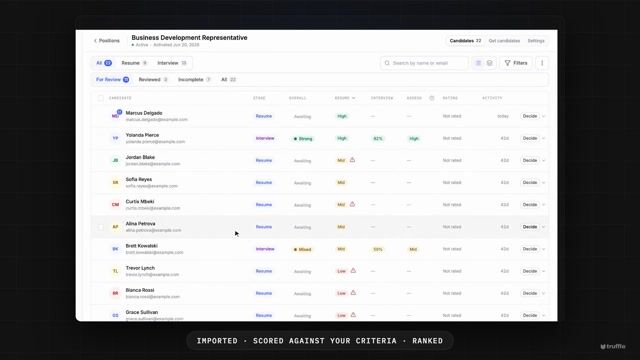
You do that once per job. From then on every Indeed application lands in Truffle on its own, with the resume attached, scored against the criteria you set, ranked against everyone else who applied. The Import activity list under Get candidates shows every message that arrived and what happened to it, so a job that goes quiet is something you can check rather than guess at.
Whether the candidate is then invited to your one-way interview automatically depends on how the position is built. If it asks candidates to do everything in one sitting, imported applicants are invited on arrival. If it collects the resume first, they wait in the resume queue until you’ve looked at them, which is the point of setting it up that way.
Two Indeed settings decide whether the resume comes with them, and both are worth checking before you post:
- Ask for a resume on the job. In Indeed’s application settings, choose the option that requires one. When resumes are optional, plenty of applicants skip them.
- Attach the resume to application emails. Indeed’s application update settings have a switch for sending the resume as an attachment. Turn it on.
Without the resume, the applicant still imports, but with only Indeed’s relay address and no document to score. You get a name and nothing to read.
Sponsored jobs (Indeed Apply URL): Enable “Apply with URL” via Indeed’s employer settings. Paste your external interview link as the apply destination. When candidates click Apply, they land directly on your interview. Confirm tracking and candidate confirmations work end-to-end.
Free postings (job description link): Keep the standard Indeed apply flow, then direct candidates to your interview link in the job description. Place it near the top with clear instructions:
To be considered for this role, complete our 10-15 minute video interview after you apply: [your link]. 4-6 questions, about 1-2 minutes each, one retake per question. Mobile-friendly, no login or downloads required. Please complete within 48 hours. We review in order.
Repeat the link near the bottom and in your auto-reply email.
Step 5: Test before you launch
Open the link on an iPhone and an Android. Verify: Branding (logo, job title, intro message), instructions (time estimate, retakes, deadline), recording and playback, and completion confirmation. If it takes more than a minute to figure out how to start recording, fix it before candidates see it.
Step 6: Review with structure, not just gut
The point of replacing Indeed’s one-way interview is to review faster, not to add admin.
Use transcripts and summaries to triage quickly. Watch full videos only for candidates who look promising on paper. Score with a consistent rubric so you’re comparing apples to apples, not vibes to vibes.
If your tool provides AI-generated summaries or match scores, treat them as decision support: helpful for prioritization, but you’re still making every advancement call yourself.
Step 7: Close the loop
Set a review cadence (“we review within 48 hours”) and stick to it. Batch-share candidate profiles with your team using a consistent scorecard. Advance your top candidates to a live call or on-site quickly. Speed matters in high-volume hiring because good candidates disappear fast. Send closure messages promptly to everyone else.
Track completion rate weekly. If it drops, shorten the interview or clarify the instructions before blaming candidate quality.
When to use one-way video interviews (and when not to)
Here’s when to, and when not to, use async video interviews.
- Use it for: High-volume early screening where phone scheduling is the bottleneck. Hourly, retail, hospitality, customer service, seasonal, entry-level. Plus any role where you’re sorting a large candidate pool and need consistent signal across candidates (sales, support, operations, technical roles).
- Skip it for: Final-round conversations (offer negotiation, culture and expectation-setting, closing), real-time problem-solving assessments (pair programming, whiteboarding, live role plays), and any interview that needs genuine back-and-forth to evaluate depth.
The hybrid that works: Async to narrow the field, live to go deep. Screen with structured video, review transcripts and scores, then run live interviews only with candidates who’ve earned a real conversation. That’s also where Indeed Interview still earns a place in your funnel, as the live step after your async screen, not instead of it.
What to look for in replacement software
If you relied on Indeed’s built-in one-way interview, here’s what to prioritize in an external tool:
- Candidate experience that protects completion. Mobile-first, browser-based, no app or account required. Clear instructions and time estimates before recording starts. If candidates can’t start within a minute of clicking the link, your completion rate will suffer.
- Structured evaluation, not just a video folder. Consistent questions, built-in rubrics, and transcripts so you’re comparing candidates on the same criteria, not just watching videos and going with your gut.
- AI-resistant assessments alongside video. Personality, situational judgment, and environment fit assessments measure what AI can’t fake: how candidates actually approach work, not how well they prompt ChatGPT.
- AI that helps you review, not decides for you. Summaries, match scores with reasoning, and highlight reels that speed up triage. Every score should be explainable so you can evaluate the AI’s work yourself.
- Questions reviewed for legal risk before they go live. Some tools flag questions that touch on protected characteristics before candidates ever see them, catching a compliance problem while you’re building the interview instead of after a candidate complains.
- One link you control. Distribute the same link across Indeed, your ATS, email, SMS, and your careers page. If the tool requires a different setup per channel, it’s going to slow you down.
- A way in that isn’t a link. Job boards will email you each application. A tool that can take those emails directly turns Indeed into an intake channel without a redirect, which matters most on the postings where every extra click is an applicant you don’t get.
- ATS integration. Auto-send the link when a candidate hits a specific stage, write results back to the candidate record, and sync disposition status. Confirm the full loop works for your specific ATS before committing.
- Setup speed. You should be live with real candidates in under 15 minutes. If the tool requires an implementation project, it’s built for a different buyer.
Truffle is an AI screening platform that combines one-way video interviews, talent assessments, and resume screening. It’s built for small teams that are always hiring, so use any capability on its own, or combine all three.
It checks every box above: one link, an import address per position so Indeed applications arrive without a redirect, AI-generated interview questions built from your position description, a Question Compliance Check that flags legally risky questions before you publish, transcripts, summaries, match scores with the reasoning shown, and Candidate Shorts highlight reels so you’re not watching full recordings to find the good ones.
Plans start at $49/month, credit-based, with every feature on every plan. Start a 7-day free trial with 30 credits, no card required, or see the full setup on the one-way video interview software page. Whatever you choose, the criteria above are what actually matter.
FAQs about Indeed’s one-way interview feature
Is Indeed’s one-way interview feature really gone?
As a dedicated, structured interview step, yes, for most employers. Indeed replaced it with Indeed Interview, a live, scheduled video tool. There’s no official retirement announcement, but the structured async option isn’t part of that replacement, and it’s no longer visible in most Employer Dashboards.
Does Indeed still let candidates record video or voice answers at all?
In a limited way. Indeed’s Screening tools let you invite candidates to answer individual screener questions by voice or video recording during the application. That’s not the same as a structured one-way interview: there’s no multi-question set, no published time limit or retake policy, and no scoring or ranking. It’s a lightweight signal at the application stage, not a replacement for a real screening interview.
What is Indeed Interview, and is it the same thing as the old one-way interview?
No. Indeed Interview is a live video call between you and a candidate, scheduled like a meeting. A one-way interview is pre-recorded, and the candidate answers on their own time with no one on the other end. They solve different problems: one replaces a phone screen, the other replaces the scheduling that a phone screen requires.
How do I keep async screening if I still post jobs on Indeed?
Three ways. The one that costs you no applicants is auto-import: Indeed emails each application to your screening tool, so candidates never leave Indeed’s apply flow. In Truffle you paste the position’s import address into the Indeed job and tick “Send an individual email each time someone applies”. The other two send candidates to your interview link instead, through Indeed’s Apply URL setting for sponsored jobs or a link in the job description for free postings.
What questions should I ask in a one-way interview?
Keep it to 3-6 questions built around one screening goal: eligibility, job-fit signals, or a specific skill check. See a full bank of proven one-way interview questions organized by what each one reveals.
Is a one-way interview legally risky?
It can be, like any interview, if your questions touch on protected characteristics. The fix isn’t avoiding video. It’s reviewing your questions before they go out. Some screening tools flag questions that could be legally problematic before you publish them, which catches the problem at the source instead of after a candidate complains.
Do candidates actually finish one-way interviews?
Most do, if the experience is short and mobile-friendly. Completion tends to drop when the interview runs long, requires an app or account, or doesn’t say upfront how many questions there are and how long it takes. Track your completion rate weekly. If it drops, shorten the interview before you blame candidate quality.