Your candidate database is full of ghosts. Here's how to fix it.
Most candidate databases are graveyards of outdated resumes. Here's how to build one that actually helps you hire.


AI summary
- A candidate database full of resumes is a filing cabinet. One with structured interview data is a recruiting asset.
- Add one-way interview responses to your candidate database and every past candidate becomes searchable and comparable.
- The best candidate databases capture how people think and communicate, not just where they've worked.
You have 2,000 names in a spreadsheet. A new position opens. You start scrolling.
Thirty minutes later, you’ve found twelve people who might be relevant. Their resumes are from 2024. Three have moved companies since then. One works at your competitor now. You have no idea if any of them can actually do the work you need done.
This is the reality of most candidate databases. They’re full of records. They’re empty of signal.
The problem isn’t that you haven’t collected enough candidates. It’s that you’ve been storing the wrong data about them. A name, an email, and a two-year-old resume don’t tell you whether someone can think on their feet, communicate under pressure, or align with what your team actually needs.
A candidate database is only as useful as the information inside it. And for most teams, that information starts and ends with a PDF.
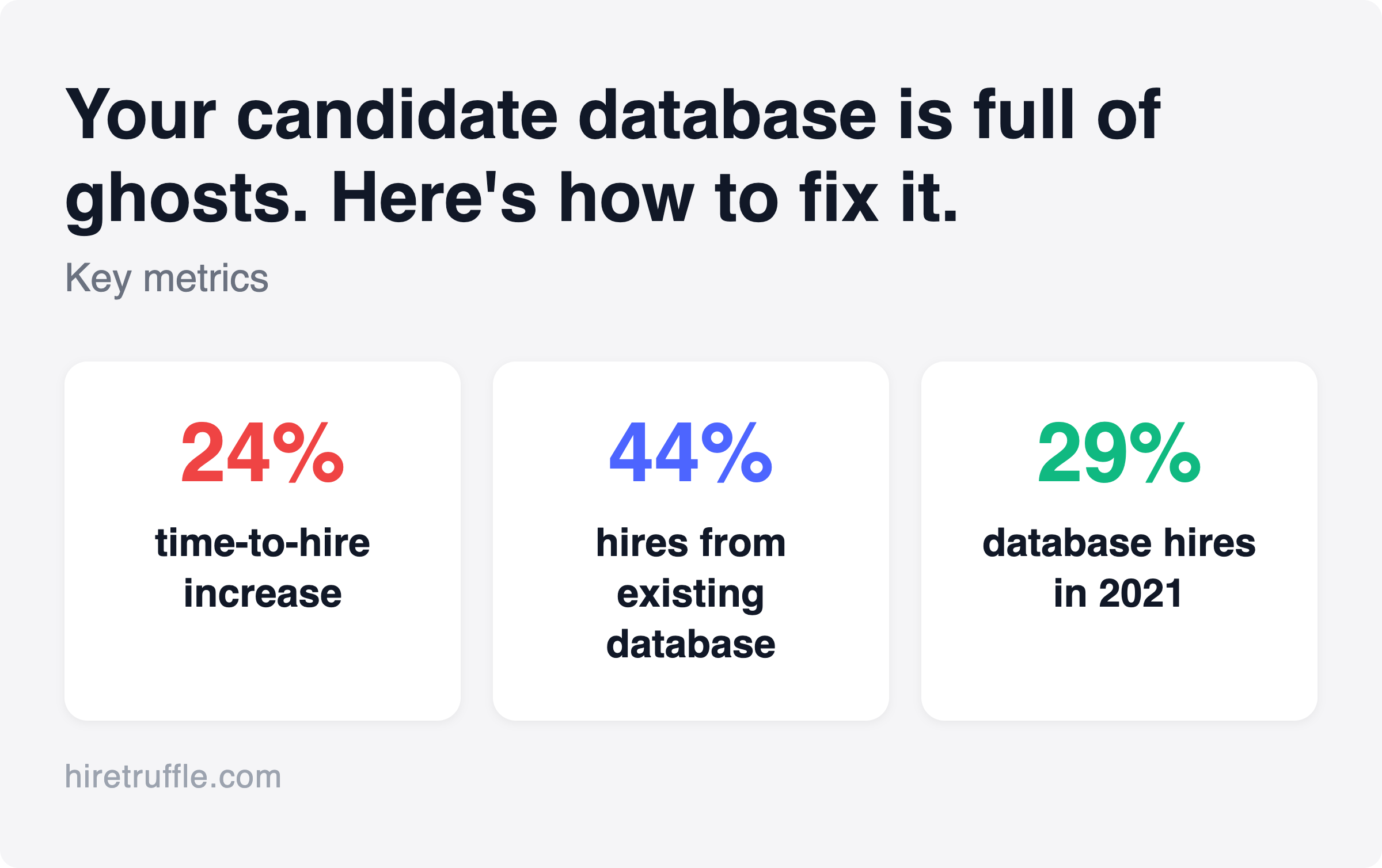
The cost shows up in your hiring timeline. Average time to hire reached 41 days in 2024, up 24% from 33 days in 2021, according to Gem’s 2025 recruiting benchmarks report. A well-managed candidate database is one of the few levers that can actually pull that number down.
candidate database
What a candidate database actually is
A candidate database is a centralized system where you store, organize, and search information about people who’ve applied to or been sourced for positions at your company. That’s the textbook definition.
In practice, it’s usually one of three things: a spreadsheet tab you’ve been meaning to organize, a folder of resumes inside your ATS, or a CRM that nobody updates.
The concept is simple. Collect information about candidates. Make it searchable. Use it to fill future positions faster.
The execution is where things fall apart. Most databases become write-only systems. Data goes in. Nothing useful comes back out. The reason is almost always the same: the data itself isn’t structured, isn’t rich enough, and isn’t maintained.
How to build a candidate database
Before you pick a tool or start importing resumes, you need a structure. Most candidate database management problems trace back to skipping this step.
Step 1: Define what fields matter. List every attribute that helps you evaluate a candidate for positions you hire for regularly. Skills, location, seniority, department fit. Make them specific to your business, not generic.
Step 2: Choose where to store it. Spreadsheet, ATS, or dedicated candidate database software. The right choice depends on your volume (more on this below).
Step 3: Set your intake process. Every candidate who enters your system should go through the same collection process. Inconsistent intake creates inconsistent data, which breaks search.
Step 4: Add a maintenance schedule. Decide how often records get reviewed, what triggers a record update, and when records get deleted. Build this into the calendar before your database grows large enough that maintenance becomes a project.
Step 5: Define what makes a record “good.” Not all candidate records are equal. A good record has structured fields, an interview note or recording, a position history, and an engagement date. Define your standard and enforce it from the start.
That’s how to build a candidate database that remains useful over time. The structure you set in week one determines whether you’re searching or scrolling twelve months later.
Candidate database vs. ATS vs. spreadsheet
These three tools overlap, but they solve different problems. Knowing where each one breaks helps you decide what you actually need.
Spreadsheets (Google Sheets, Excel) are where most small teams start. They’re free. They’re flexible. And they work fine when you’re hiring one or two people per quarter.
They break when you hit about 200 candidates. Sorting gets slow. There’s no way to attach files. Search is limited to exact text matches. And when two people edit the same sheet, things go wrong fast. If you’re tracking candidates across multiple positions, spreadsheets become unmanageable.
An ATS (Greenhouse, Lever, JazzHR, BambooHR) gives you structure. You get stages, status tracking, email integration, and usually some reporting. Most are built around the hiring funnel: application, screen, interview, offer, hire.
The problem? Your ATS is a database, not a screener. It tracks where candidates are in the process. It doesn’t tell you much about who they are. As one recruiter put it, it’s a filing system for resumes with workflow automation on top. The candidate intelligence layer is usually missing.
A dedicated candidate database goes further. It’s designed for search, tagging, enrichment, and re-engagement. It stores structured data, not just documents, so you can filter by skills, interview performance, availability, or any other attribute that matters for a specific position.
The right choice depends on your hiring volume. Under 50 candidates per quarter, a well-organized spreadsheet works. Over 50, you need an ATS. Once you start wanting to reuse candidate data across positions or over time, you need a real database layer.
What to store (and what most teams skip)
Here’s what a typical candidate database contains: name, email, phone number, resume, and maybe a source tag (Indeed, LinkedIn, referral).
Here’s what it should contain.
Contact and source info. The basics. Name, email, phone, where they came from, when they first entered your system. Non-negotiable.
Position history. Every position they’ve been considered for, the outcome, and why. “Rejected, stage 2, lacked Excel proficiency” is more useful a year later than just “Rejected.”
Structured interview data. This is where most databases fall short. If a candidate did a phone screen, what did you learn? If they did a video interview, do you have the recording? The transcript? Any notes beyond “seemed good”?
Imagine you’re filling a customer success position. You search your database and find fifteen people who applied for similar positions last year. You have their resumes. But you can’t remember a single thing about how they communicated, what motivated them, or whether they could handle a frustrated customer.
Now imagine you had a 30-second highlight reel from each of their interviews. A summary of their key responses. A score showing how closely they matched the criteria for that previous position. Suddenly your database is useful.
Skills and qualifications. Not just what’s listed on a resume, but what’s been demonstrated. Certifications, assessment results, qualification check responses. Structured fields are better than free-text notes because they’re searchable.
Tags and categories. Department fit. Seniority level. Location preference. Willingness to relocate. Remote-friendly. These attributes let you slice your database quickly when a position opens.
Engagement status. When did you last reach out? Did they respond? Are they currently employed? A database full of candidates who haven’t heard from you in two years is a database full of strangers.
How to organize your candidate database so you can actually find people
The point of a database is retrieval. If you can’t find the right person in under five minutes, your organizational system isn’t working. Good candidate tracking depends less on the tool you use and more on how consistently you’ve structured the data inside it.
Use consistent tags. Decide on a taxonomy and stick with it. If “Customer Support” is a department tag, don’t also use “Customer Service,” “CS,” and “Support.” Inconsistent tagging is the number one reason search fails.
Make key fields structured, not free-text. A “Skills” field that says “good with people, Excel, some SQL” is nearly unsearchable. A multi-select field with standardized skill tags is filterable. Every time you record an observation as prose when it could be a tag, you’re making future-you’s life harder.
Track position connections. Every candidate should be linked to the position(s) they applied for. This creates a history. When a position opens for a marketing coordinator, you want to pull up everyone who’s ever been in the pipeline for a marketing position, not just people whose resumes happen to contain the word “marketing.”
Sort by signal, not by date. Most databases default to showing the most recent candidates first. That’s useful for active positions. For a talent pool database, you want to sort by relevance. How closely does this person match the requirements for the position you’re filling right now?
Here’s a scenario that illustrates the difference. Your company filled a sales development position six months ago. Now a second one opens. In a date-sorted database, you’d start from scratch or manually scroll back to last quarter’s candidates. In a signal-sorted database, you’d filter for candidates who previously matched strongly on sales criteria, check their engagement status, and reach out to the top five.
That only works if your database captured signal, not just timestamps.
Keeping your data fresh
Candidate database management is mostly a maintenance problem. The collection part is easy. Keeping data accurate over time is where most teams fall behind.
Candidate data decays fast. People change positions. They move cities. They gain new skills. A database you haven’t updated in twelve months is telling you about people who no longer exist (professionally speaking).
The scale of this problem is larger than most teams realize. According to Gem’s 2025 benchmarks report, 44% of sourced hires are now rediscovered within a company’s existing ATS or CRM, up from 29% in 2021. That’s a meaningful change in sourcing strategy. More hires are coming from existing databases rather than fresh sourcing. But only if those databases are maintained.
Set a review cadence. Quarterly is reasonable for active talent pools. Annually for long-term pipelines. During each review, flag records that need updating and remove those that are clearly outdated (email bounced, candidate asked to be removed, position no longer relevant).
Automate what you can. Some tools can flag stale records based on last-contact date or auto-enrich profiles with updated information. At minimum, set up a filter that surfaces records older than 12 months with no activity.
Make re-engagement part of the process. When a new position opens, don’t just search your database. Reach out to relevant candidates with a quick message. Their situation may have changed. The candidate who wasn’t available in January might be actively looking in March.
Delete what you can’t use. This sounds counterintuitive, but a smaller, accurate database beats a large, stale one. If a record has no email, no phone number, and a resume from three years ago, it’s taking up space and adding noise to your searches.
GDPR, compliance, and data you shouldn’t keep
If you store candidate data, you have legal obligations. The specifics depend on your location and your candidates’ locations, but a few principles apply broadly.
Tell candidates what you’re storing. Most data protection frameworks require you to inform people that you’re keeping their information and why. This is usually handled through your privacy policy and application process.
Set retention limits. Don’t keep candidate data forever. Most companies set a retention period (6 months, 12 months, 24 months) after which records are deleted or anonymized unless the candidate has given consent to stay in your talent pool.
Honor removal requests. If a candidate asks you to delete their data, do it promptly. This isn’t optional in GDPR jurisdictions, and it’s good practice everywhere.
Be careful with sensitive data. Demographic information, health details, and other protected categories generally shouldn’t be in your candidate database at all. If your qualification questions touch on work authorization or certifications, that’s different from storing age, ethnicity, or disability status.
This isn’t legal advice. Talk to your legal team about the specifics for your company. But the general principle is: store what you need, protect it properly, delete it when you don’t.
Tools that make your candidate database actually work
The gap in most candidate databases isn’t the storage. It’s the intelligence.
You can store 10,000 resumes in any ATS. The question is whether you can quickly identify which of those 10,000 people is worth talking to when a new position opens.
Most candidate database software falls into one of three categories. First, ATS platforms (Greenhouse, Lever, JazzHR) that organize the hiring funnel but don’t go deep on candidate intelligence. Second, CRM-style tools (Gem, Beamery) that focus on relationship management and sourcing pipelines. Third, AI recruiting software that adds a layer of structured evaluation data on top of basic storage.
The category that matters most depends on where your process breaks down. If you can’t track who’s in which stage, you need an ATS. If you lose candidates between positions and have no way to re-engage them, you need better candidate screening software. If you have all the records but no signal about what each candidate actually said or how they performed, you need the third category.
This is where the traditional approach, collecting resumes and contact info, hits a wall. A resume tells you where someone worked and what they claim they can do. It doesn’t tell you how they think, how they communicate, or how closely they match what you actually need.
One-way video interviews change what’s possible here. When candidates record video responses to your screening questions, you’re not just collecting a document. You’re capturing structured, searchable interview data that enriches every record in your database. If you’ve been looking for one-way interview questions that generate useful signals, the intake design matters as much as the tool.
Truffle is an AI screening platform that combines resume screening, one-way video interviews, and talent assessments. Every completed screening automatically generates several layers of data. AI Summaries give you the key takeaways from each candidate’s responses. AI Match scores show how closely each candidate aligns with the criteria you defined during intake. Candidate Shorts surface the most revealing moments from each interview in a 30-second highlight reel. Full transcripts make every response searchable.
That means when you search your database six months later, you’re not squinting at a resume wondering if this person could handle the position. You have a summary. You have clips. You have a score against specific criteria. You can make a decision about whether to re-engage in seconds, not hours.
The Candidate Dashboard lets you filter and sort candidates by match score, status, or date across every position. It’s designed for exactly the scenario where you need to surface the right person from a large pool quickly.
And because all of this data is generated automatically during the screening process, it doesn’t require extra work from your team. The candidate records in your database are richer from day one.
The bigger picture
Most teams think about their candidate database as a filing cabinet. A place where records go and occasionally get retrieved.
The more useful frame is a living system where every interaction, every interview, every screening adds signal to a candidate’s record. Over time, your database gets smarter. Not because AI is deciding who’s good. Because you’re capturing more of the information that helps you make better decisions.
The companies that hire well from their existing candidate pool aren’t the ones with the most records. They’re the ones with the richest records. They know what each candidate said in their interview. They know how closely each one aligned with specific criteria. They can pull up a 30-second clip instead of re-reading a resume for the fourth time.
A database with rich signal is also one of the most reliable levers for how to hire faster. When a position opens, you’re not starting from zero. You’re re-engaging candidates you already know something about.
Building that kind of database doesn’t start with buying new software. It starts with rethinking what data is worth collecting in the first place. Resumes are a starting point. Interview data is the advantage.
Frequently asked questions about candidate databases
What is a candidate database?
A candidate database is a centralized system for storing and organizing information about people who have applied to or been sourced for positions at your company. It typically includes contact details, work history, position history with your organization, and any interview or assessment data collected during the hiring process. The most useful databases go beyond resumes to include structured interview data and searchable notes.
What’s the difference between a candidate database and an ATS?
An ATS (applicant tracking system) manages the hiring workflow. It tracks where each candidate is in the process, handles communication, and stores documents. A candidate database focuses on search and reuse. It’s built so you can find the right person across all past positions, not just the current one. Many ATS platforms include basic database features, but dedicated database tools or candidate screening platforms with built-in evaluation tools add structured data that makes records genuinely searchable.
How do you organize a candidate database effectively?
Use consistent tags instead of free-text notes wherever possible. Link every candidate to the specific positions they’ve been considered for. Include structured fields for skills, seniority, and location preference rather than burying that information in resume attachments. And capture interview data alongside contact info so that a record tells you something about how the candidate communicates, not just where they’ve worked. Good candidate recruitment practice means each touchpoint adds to the record.
How long should you keep candidate data?
Most companies set retention periods of 12 to 24 months, after which records are deleted or anonymized unless the candidate has given consent to remain in your talent pool. GDPR and similar data protection frameworks require you to inform candidates what you’re storing and why, and to delete records promptly on request. When in doubt, store less, communicate clearly, and talk to your legal team about the specifics for your jurisdiction.