How to set up a one-way video interview
To set up a one-way video interview in Truffle, create a position, describe the role, keep Video Interview switched on, review the questions Truffle drafts, set think time, answer time and retakes, preview it as a candidate, and activate. Every answer comes back scored against your criteria with the reasoning shown, and you decide who moves on.
Key takeaways
- You describe the role in plain language on Define the role. Truffle reads the description to suggest your screen and draft the interview questions.
- On Build position, Video Interview arrives switched on with a summary of the interview Truffle set up. It costs 5 credits per screening, charged only when a candidate submits the interview.
- You choose how candidates answer: video or audio, time to think (None to 5 minutes, or Unlimited), time to answer (1 to 3 minutes) and retakes (No retakes to 3 retakes). The settings apply to every question.
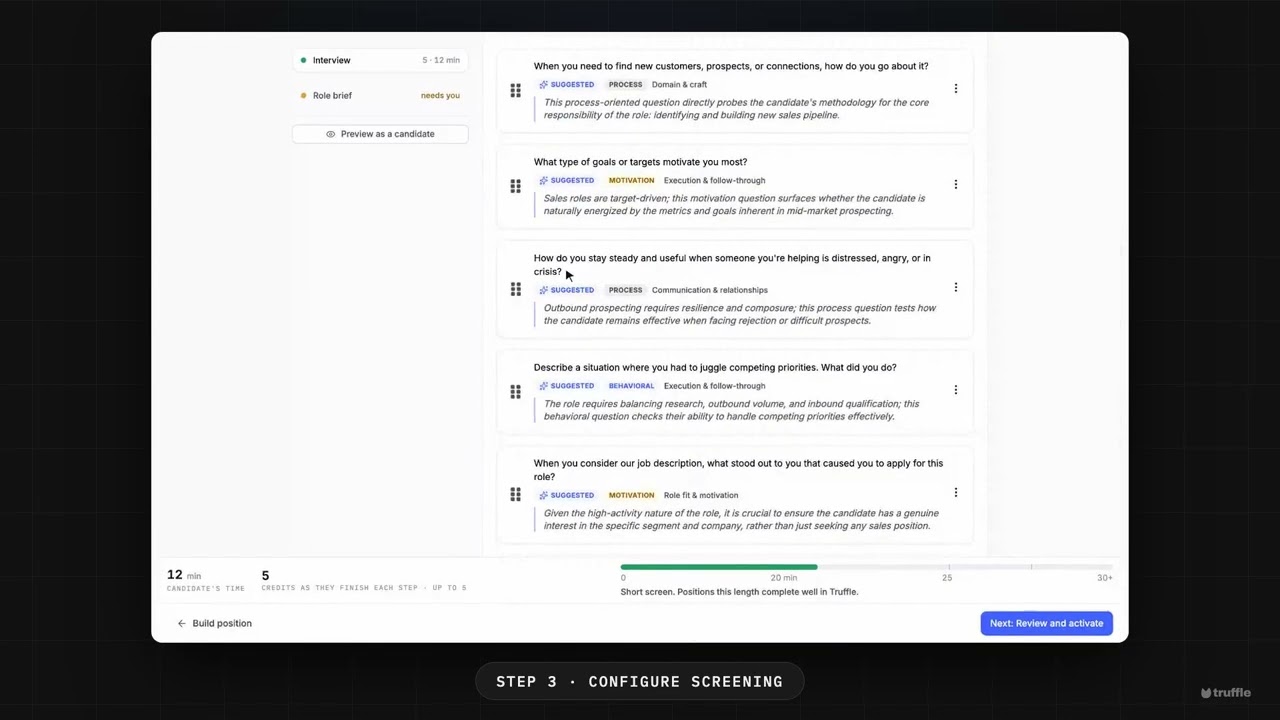
- Truffle drafts the questions from the role, five for the sales role in this video. Keep them, swap one from the bank with Replace question, or write your own. An interview holds up to 10 questions.
- Preview as a candidate shows you exactly what candidates will see, and it works on a draft. Then add your branding and activate.
- Every answer comes back scored against your criteria, with the reasoning shown. A score never rejects anyone. You decide who moves on.
Set up a one-way video interview in Truffle, start to finish, in about a minute.
You create a position and describe the role in plain language. Truffle suggests the screen, with Video Interview already on, and drafts the questions from the role. You set how candidates answer, keep or swap the questions, preview the interview as a candidate, and activate. Candidates record on their own device, on their own time, and every answer comes back scored against your criteria with the reasoning shown.
Prefer to follow along in writing? The step-by-step guide has every screen.
Transcript
Read the full transcript
Here’s a one-way video interview, set up in a few minutes. Let’s build one. Start a new position, and describe the role. Give it a title, and a description in plain language. Truffle reads it, to suggest your screen. On Build position, Truffle suggests what candidates go through. Video Interview is already on, with a summary of the interview it set up. In interview setup, you choose how people answer. Time to think, time to answer, retakes, and video or audio. Truffle drafts five questions from the role. Open a question’s menu to swap one from the bank, or write your own. Then preview it as a candidate, so you see what they’ll see. Last, review and activate. Put your brand on it, and activate. Every answer comes back scored against your criteria, with the reasoning shown. You decide who moves on. Start free at hiretruffle.com.
Frequently asked questions
- Do candidates need to book a time or install anything?
- No. Candidates open a link and record their answers on their own device, on their own time. There is nothing to schedule and nothing to install. They complete the interview in one sitting.
- How much does a one-way video interview cost?
- 5 credits per completed interview. Credits are charged only when a candidate submits the interview, so someone who never starts or does not finish costs nothing. The 7-day free trial includes 30 credits with no credit card, and plans start at $49 a month.
- Can I change the questions Truffle drafts?
- Yes. Each drafted question has a menu with Replace question, which opens the question bank, and Remove question. You can also write your own, up to 150 words, and Truffle checks it for quality and fairness as you type. Questions you write are saved for reuse on future positions. An interview holds up to 10 questions.
- Can I run the interview without resume screening or assessments?
- Yes. Every component on Build position stays switchable. Switch off Resume and Assessments and the position runs the interview on its own.
- Does Truffle decide who passes the interview?
- No. AI scores the transcript of each answer against a rubric for the role and shows you the scores with the reasoning. A score never rejects anyone. The only automatic rejection in Truffle is a qualification check you set to Reject automatically. You review the candidates and make the call.
See it in Truffle
Replace 25 hours of phone screens with 25 minutes of Candidate Shorts, and hire with the evidence in front of you. 7-day free trial, no credit card.