How to review job candidates and decide who moves on
To review candidates in Truffle, open a position's candidate list, switch to Focus view for Magic Review, and read each candidate's Candidate Shorts, criteria coverage and summary before you decide: Advance, Hold, Reject or Hire. Signals rank every candidate against your criteria with the reasons shown, and every decision is yours.
Key takeaways
- Each row on a position's candidate list shows its signals. When a position uses two or more, resume, interview and assessments roll up into one Overall read: Strong, Mixed or Weak.
- Focus view opens Magic Review: one candidate at a time on the right, with the list beside you on the left, so you never lose your place.
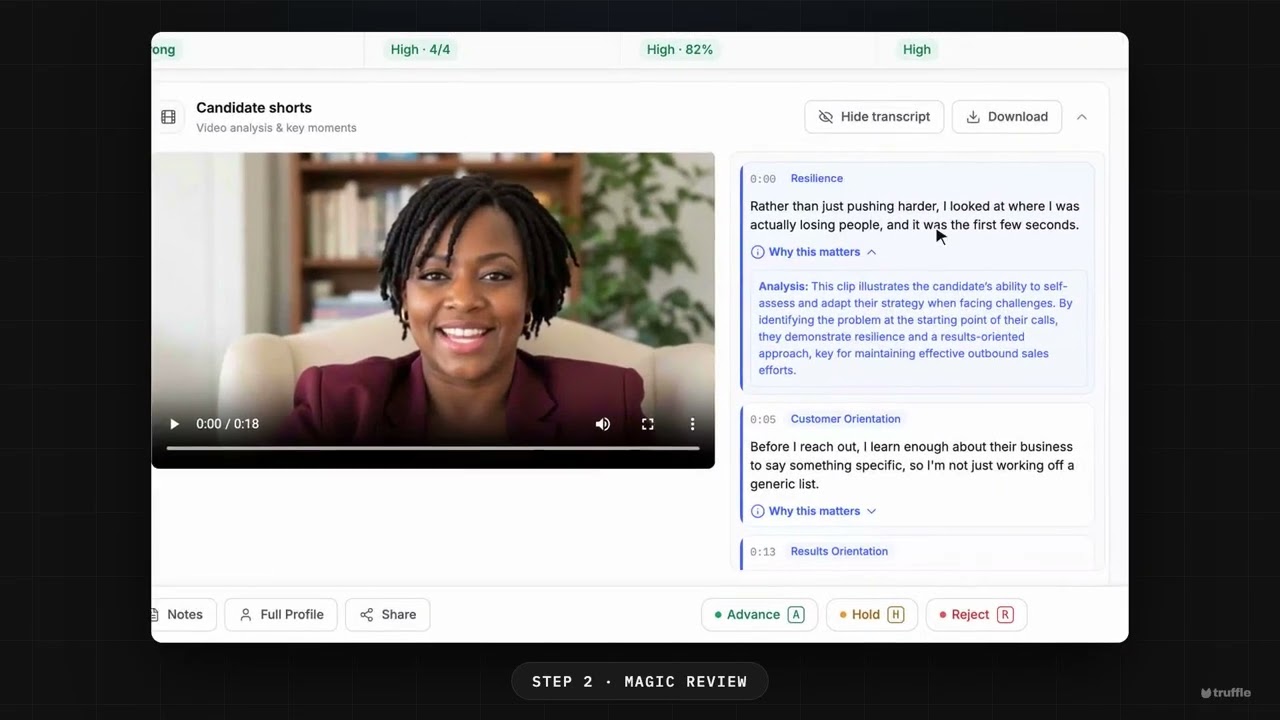
- Candidate Shorts pull key moments from the interview, each with a note on why it matters. Criteria coverage shows how the candidate matches each of your criteria.
- Decide offers Advance, Hold, Reject and Hire. A decided candidate moves from For Review to Reviewed, and Clear decision sends them back.
- In Magic Review, A advances, H holds and R rejects the candidate on screen, and the next one opens. Hire is in the Decide menu on the list view, not in Magic Review.
- A decision changes the candidate's status in Truffle and does not email them. Scores never advance, hold or reject anyone.
Review a position’s candidates in one pass, and decide who moves on.
The candidate list shows each candidate’s signals, rolled into one overall read. Focus view opens Magic Review: one candidate at a time, with Candidate Shorts from their interview, how they match each of your criteria, and a summary with key insights. Then you decide. Advance, Hold, Reject or Hire. Every candidate is ranked against your criteria with the reasons shown, and every decision is yours.
Prefer to follow along in writing? The Magic Review guide and the decision guide have every screen.
Transcript
Read the full transcript
Here’s how to review a position’s candidates in one pass, and decide who moves on. Open a position’s candidates. Each row shows its signals. Resume, interview, and assessments, rolled into one overall read. Switch to Focus view for Magic Review. One candidate at a time, with the list beside you. Candidate shorts pull the key moments from their interview, and show why each one matters. Criteria coverage shows how they match each of your criteria. Then read the summary, with the key insights. When you’re ready, open Decide. Advance, hold, reject, or hire. Choose Advance, and they move to Reviewed. In Focus view, one key does the same, and the next candidate opens. Every candidate, ranked against your criteria, with the reasons shown. Every decision is yours. Start free at hiretruffle.com.
Frequently asked questions
- What is Magic Review?
- Magic Review is the Focus view of a position's candidate list. The list stays on the left and one candidate opens on the right, with their signals, Candidate Shorts, criteria coverage and summary, so you can read each candidate and decide without leaving the page.
- Which keyboard shortcuts does Magic Review have?
- A advances, H holds and R rejects the candidate on screen. The keys are printed on the Advance, Hold and Reject buttons. The up and down arrow keys move to the previous or next candidate, and on a decided candidate Backspace clears the decision. Keys do nothing while you type in a field.
- Does Truffle email the candidate when I make a decision?
- No. Advance, Hold, Reject, Hire and Clear decision change the candidate's status in Truffle and nothing else. Tell the candidate yourself.
- Can I undo a decision?
- Yes. Choose Clear decision from the status menu on the Reviewed tab, or press Backspace in Magic Review, and the candidate goes back to For Review. The message after each decision in Magic Review also has Undo. Hired is final in the candidate list.
- Does the AI make the decision?
- No. The signals score each candidate against the criteria for the position and show the reasons. You decide what happens to every candidate. Scores never advance, hold or reject anyone. The only automatic rejection in Truffle is a qualification check you set to Reject automatically.
See it in Truffle
Replace 25 hours of phone screens with 25 minutes of Candidate Shorts, and hire with the evidence in front of you. 7-day free trial, no credit card.