ATS Native

Truffle + Pinpoint

Screen resumes and send interviews from your Pinpoint pipeline, with the results back on the candidate's record.

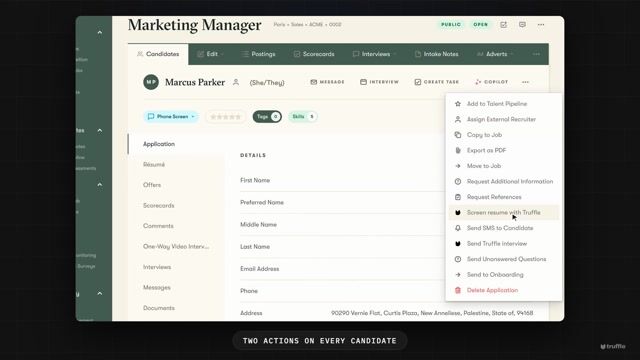
Truffle runs as a plugin inside Pinpoint. Connect it once with a key Truffle creates for you, and every candidate in Pinpoint gets two actions: Screen resume with Truffle and Send Truffle interview. When scoring or the interview finishes, the result lands on the candidate's Pinpoint record: the match, whether the requirements were met, the evidence behind each one, and a link to the full report in Truffle. Your recruiters stay in Pinpoint.

See it work

Connect Pinpoint in under two minutes

Video thumbnail: How to connect Pinpoint to Truffle

Step-by-step guide with screenshots

What you can do

Built for the way you hire with Pinpoint

Two actions on every Pinpoint candidate

Open a candidate's actions menu in Pinpoint and choose Screen resume with Truffle or Send Truffle interview. Each action offers only the open Truffle positions that are set up for it, so nobody is sent into a screen that isn't ready.


Resume screening that never contacts the candidate

Screen resume with Truffle scores the candidate's resume against the position's resume criteria, requirement by requirement, with the evidence it found for each one. The resume can be a PDF or DOCX of up to 5 MB. Nothing is sent to the candidate.

Interview invitations from the record

Send Truffle interview emails the candidate Truffle's invitation. When they finish, the interview score and tier come back to Pinpoint, with assessments as a tier. Scores never reject anyone: you decide who moves on, in Pinpoint.

Results on the candidate's Pinpoint record

Each result appears under the candidate's Assessments in Pinpoint as a scored record: provider, status, the position it was run against, the match or tier, the requirements and evidence, and a link to the full report in Truffle. See how the results read.

Setup

Three steps. About five minutes.

  1. Create the key in Truffle

    In Truffle, open Settings, then Integrations & API. Find Pinpoint under Available, choose Connect, then Create key. Truffle asks for nothing from Pinpoint. Owners and admins on a paid plan can do this.

  2. Copy it. Truffle shows it once

    Copy the key from the Pinpoint connected panel before you choose Done. If you close it without copying, Reconnect creates a new key, and the old one keeps working for 7 days while you update Pinpoint.

  3. Paste it into the Truffle plugin in Pinpoint

    In Pinpoint, open Integrations, then My Plugins, and open the Truffle plugin's configuration. Paste the key into Truffle API key and save. The Truffle actions appear on your candidates.

  4. Run Truffle from a Pinpoint candidate

    Set up your Truffle positions for what you will run: resume criteria for resume screening, an interview or assessments for the interview. Then choose an action on a candidate. Step-by-step guide with screenshots.

FAQ

Common questions about Pinpoint + Truffle

Do I need a Pinpoint API key?
No. Pinpoint calls Truffle through the plugin, so the only key is the one Truffle creates for you to paste into the plugin's configuration.
Does Screen resume with Truffle email the candidate?
No. It scores the resume against the position's resume criteria and does not contact the candidate. Send Truffle interview is the action that sends an invitation.
What comes back to Pinpoint?
The resume match and tier with the evidence per criterion, the interview score and tier, assessments as a tier, and a link to the candidate's full report in Truffle. Results appear under the candidate's Assessments in Pinpoint.
Why does a position not show up in the plugin?
Each action only offers open Truffle positions set up for it: resume criteria for Screen resume with Truffle, an interview or assessments for Send Truffle interview. Closed, archived or expired positions refuse new sends.
What do I need to set this up?
A paid Truffle plan and the Owner or Admin role in Truffle, plus the Truffle plugin added in Pinpoint. A free trial cannot connect Pinpoint.
I closed the key panel without copying the key. What now?
Truffle cannot show it again. Choose Reconnect and Create key to get a new one. The old key keeps working for 7 days while you update the plugin.

Ready to plug Truffle into your ATS?

7-day free trial. No credit card. Plans from $49/month.

Truffle is an AI screening platform built for the AI age

Start free trial

7 days · 30 credits · no card required

Start typing to search 300+ pages on hiretruffle.com.

Website visitor reviewRanked by Overall
YOU
You (probably)For Review · Applied via hiretruffle.com/integration/pinpoint
Overall
Strong
Resume match
HighRelevant experience includes being on the website. (Okay the bar isn't high.)
Interview
Mixed
Requirements
1 unmet
  • Hires people
  • Read this far
  • Started a free trial

Reasoning

Match detected 🎯

We built an entire hiring metaphor to avoid saying “wait, don’t go.” Which is ironic because Truffle helps you get to the point with your candidate pool.

you're the bossAdvanceStart free trial7 days, 30 credits, no credit cardHoldBook a demo30 minutes on your real hiring problem